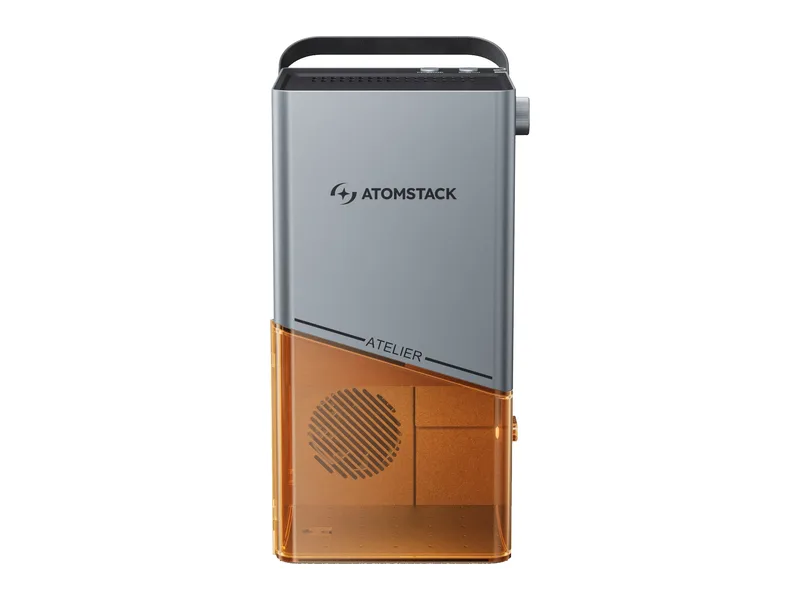
Galvo diode laser · Enclosed · AtomStack
AtomStack Atelier
Crafters, schools and market sellers who personalize small items in batches and need a Class 1 machine they can carry and run in a shared space
from $599 at AtomStack, checked Oct 22
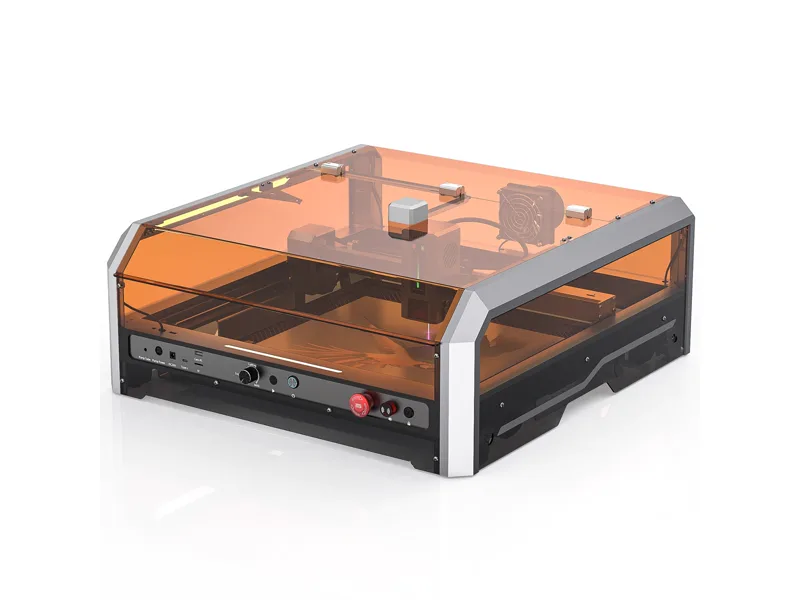
Image: AtomStack. Prices change often; the shop shows the current price.
Quick verdict
The Atelier is AtomStack's compact Class 1 galvo engraver: a 12W blue diode (two 7W Sharp diodes combined, per AtomStack) scanning a 120 x 120 mm field at a claimed 4,000 mm/s, inside a 3.5 kg enclosure with a hinged door, door interlock, tilt stop and USB safety key. A built-in camera handles placement and batch positioning in AtomStack Studio, and LightBurn works with AtomStack's galvo profile. It arrives assembled and can run from a power bank. The trade-offs are the small field, cutting that tops out around 6 mm wood, manual focus and no air assist. At $599 it is a fast, safe small-item engraver, not a sheet cutter.
What you still need
A window route for the included exhaust hose or the D3 air purifier ($129 alone; the Purifier Bundle is $699), the R4 conveyor ($149, sold out) for longer pieces, the R6 roller ($149), R8 chuck ($199) or R8 Pro set (the Rotary Bundle is $749) for tumblers and rings, a suitable portable power bank if you want to run unplugged (AtomStack does not state the required output), and a LightBurn licence if you prefer it to AtomStack StudioMaterial reality check
Engraves wood, bamboo, paper, card, leather, fabric, felt, cork, MDF, slate and stone, coated metals and dark opaque acrylic, and AtomStack says it can mark stainless steel, iron and black anodized aluminum. Cuts wood up to about 6 mm, paper, leather and thin dark opaque acrylic (maker claims). It cannot cut metal, and like every diode it cannot cut clear or blue acrylic. Never laser PVC or vinyl: the chlorine fumes are toxic and corrode the machine.Better alternative if
if you want to cut sheet material and need a full-size bed, the enclosed 20W Genmitsu L8 costs about $100 more: SainSmart Genmitsu L8 20WScores
Scored on the same scale for every laser on this site. See all lasers ranked.
Specifications
| Laser type | Galvo diode laser |
|---|---|
| Form | Enclosed |
| Optical power | 12 W |
| Other modules | None |
| Wavelength | 455 ± 5 nm |
| Work area | 120 × 120 mm |
| Max speed | 4,000 mm/s galvo engraving, 15,000 mm/s preview (maker claims) |
| Cutting (maker claim) | 6 mm wood (maker claim, passes not stated) |
| Precision | 0.01 mm motion accuracy (maker claim); camera alignment to about 1 mm |
| Air assist | None |
| Camera | Yes |
| Autofocus | No |
| Rotary support | Yes |
| Safety | Class 1 (IEC 60825-1) enclosure with a door interlock, 15 degree tilt stop, USB safety key and emergency stop/power button; no flame detection listed. AtomStack's manual says removing the baseplate or covers takes it out of Class 1 |
| Connectivity | USB-C, Wi-Fi, Phone hotspot |
| Software | AtomStack Studio (Windows, macOS, iOS, Android), LightBurn (with AtomStack's L1-GALVO profile, licence bought separately) |
| Weight | 3.5 kg |
| Price | from $599 at AtomStack, checked Oct 22 |
Pros and cons
Why we like it
- Class 1 enclosure with door interlock, tilt stop and a USB key, so it suits shared rooms and classrooms
- Galvo scanning at a claimed 4,000 mm/s makes batches of coasters, tags and keyrings quick
- Built-in camera with batch positioning places designs on several items at once
- Arrives assembled and weighs 3.5 kg with a carry handle; AtomStack says it can run from a power bank
- Hinged door means you swap material without lifting a cover or refocusing
Watch out for
- Tiny 120 x 120 mm field; the R4 conveyor stretches it to 350 x 120 mm but was sold out
- 12W cuts about 6 mm wood at best, so it is an engraver first
- Manual focus by knob and red dots, no autofocus, and no air assist
- LightBurn works but needs its own licence, and AtomStack labels the support unofficial
- No independent hands-on review found, and AtomStack's own spec table misprints the speed as mm/min
Compare with
Frequently asked questions
What materials can the AtomStack Atelier cut and engrave?
Engraves wood, bamboo, paper, card, leather, fabric, felt, cork, MDF, slate and stone, coated metals and dark opaque acrylic, and AtomStack says it can mark stainless steel, iron and black anodized aluminum. Cuts wood up to about 6 mm, paper, leather and thin dark opaque acrylic (maker claims). It cannot cut metal, and like every diode it cannot cut clear or blue acrylic. Never laser PVC or vinyl: the chlorine fumes are toxic and corrode the machine.
What else do I need to buy with the AtomStack Atelier?
A window route for the included exhaust hose or the D3 air purifier ($129 alone; the Purifier Bundle is $699), the R4 conveyor ($149, sold out) for longer pieces, the R6 roller ($149), R8 chuck ($199) or R8 Pro set (the Rotary Bundle is $749) for tumblers and rings, a suitable portable power bank if you want to run unplugged (AtomStack does not state the required output), and a LightBurn licence if you prefer it to AtomStack Studio
How much does the AtomStack Atelier cost?
From $599 at AtomStack, checked Oct 22.
How we rank: by our own scores for power, speed, ease of use, safety and value, from the maker's published specs and independent tests where they exist. Some links earn us a commission (for example TwoTrees, SainSmart, Gweike and Amazon). That never changes a score or the order of a list (disclosure).
Sources
- AtomStack Atelier product page and spec table
- AtomStack Atelier Shopify product data (prices, stock, images)
- AtomStack Atelier & P1 collection page (add-to-cart price and discount tiers)
- AtomStack Wiki: Atelier pre-sales FAQ
- AtomStack Wiki: Atelier device usage (controls, LightBurn, focusing)
- AtomStack Atelier user manual (Google Drive, linked from AtomStack product support)
- MatterHackers: AtomStack Atelier technical specifications
- Shop3DUniverse: AtomStack Atelier listing
- AtomStack US (MakerMondo distributor): Atelier specifications