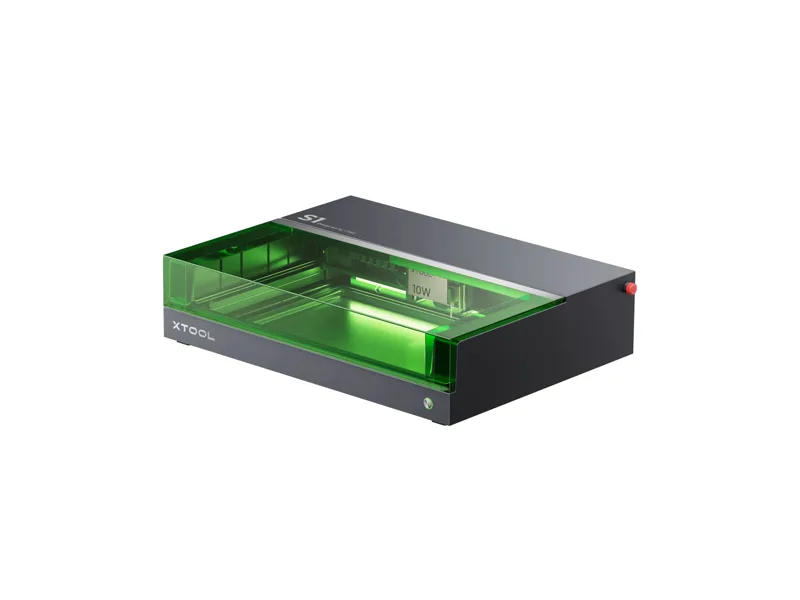
Diode laser · Enclosed · xTool
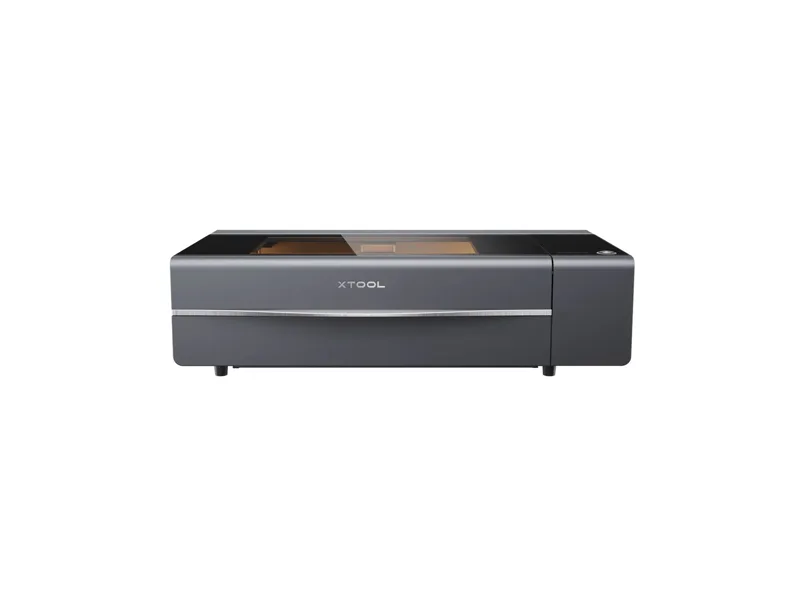
xTool S1 40W
Hobbyists and small sellers who want a powerful diode cutter for wood and dark acrylic that is safe to run in a shared space
from $1,699 at xTool, checked Oct 22
Image: xTool. Prices change often; the shop shows the current price.
Quick verdict
The S1 is xTool's enclosed gantry diode laser, and this version puts a 40W optical diode inside a Class 1 box. It covers 498 x 319 mm at up to 600 mm/s, and xTool claims 15 mm plywood or black acrylic in one pass. Autofocus, a lid interlock, flame detection and an emergency stop make it easy and safe to run in a spare room. The honest trade-off is that it is still a blue diode: no clear acrylic, no camera for placement, and thick cuts crawl along at single-digit mm/s where xTool itself says its 55W CO2 cuts up to five times faster. At $1,699 with air assist and a honeycomb bed in the box, it is a fair price for a diode this strong in an enclosure.
What you still need
A way to get rid of smoke: the built-in fan pushes it down a hose, so you need a window vent or a purifier (xTool puts its SafetyPro AP2 purifier in the $3,049 All-in-one bundle). The RA2 Pro rotary, riser base and conveyor feeder are extras unless you buy the $2,289 Deluxe bundle. xTool Studio is free, a LightBurn licence is optional. No safety glasses are needed while it runs as Class 1, but keep a fire extinguisher nearby and budget for materials and the odd replacement lens.Material reality check
Cuts wood, plywood, MDF, leather, felt, card and dark or opaque acrylic; xTool rates it at 18 mm cherry and 15 mm black acrylic. Engraves slate, stone, tile, anodized aluminum, painted or coated metal, and glass with a coating or marking paste. It cannot cut clear, blue or light transparent acrylic because the 455 nm beam passes straight through, and it cannot cut metal (the 0.1 mm stainless claim is foil, not sheet). Marking bare metal needs the optional 2W 1064 nm IR module. Never laser PVC, vinyl or anything else containing chlorine.Better alternative if
if you want to cut clear acrylic or need thick cuts several times faster, a desktop CO2 is the better tool: xTool P2SScores
Scored on the same scale for every laser on this site. See all lasers ranked.
Specifications
| Laser type | Diode laser |
|---|---|
| Form | Enclosed |
| Optical power | 40 W |
| Other modules | 2W 1064 nm infrared module optional for bare metal and plastic marking |
| Wavelength | 455 nm |
| Work area | 498 × 319 mm |
| Max speed | 600 mm/s |
| Cutting (maker claim) | 18 mm cherry, 15 mm basswood plywood or 15 mm black acrylic in one pass (maker claim) |
| Precision | 0.01 mm motion accuracy (retailer spec) |
| Air assist | Included |
| Camera | No |
| Autofocus | Yes |
| Rotary support | Yes |
| Safety | Class 1 enclosure with lid-open stop, 5-direction flame detection, emergency stop and key lock; becomes Class 4 with the Class 4 riser base and conveyor |
| Connectivity | USB, Wi-Fi |
| Software | xTool Studio, LightBurn |
| Weight | 20 kg |
| Price | from $1,699 at xTool, checked Oct 22 |
Pros and cons
Why we like it
- Class 1 enclosure means no safety glasses or laser curtain for normal use at home
- 40W optical diode cuts 15 mm plywood or black acrylic in a single pass
- Large 498 x 319 mm work area plus a passthrough for long boards
- One-click autofocus and curved-surface engraving take the guesswork out of focusing
- The US Basic bundle already includes air assist and a honeycomb panel
Watch out for
- No camera, so you place jobs with the red-dot pointer instead of a live preview
- Cannot cut clear or blue acrylic, and bare metal needs the optional IR module
- Thick cuts are slow: xTool's own table says 6 mm/s through 10 mm basswood
- Weighs 20 kg and still needs a vent hose out of a window or a purifier
- LightBurn works, but curved-surface mode and module position features stay in xTool Studio
Compare with
Frequently asked questions
What materials can the xTool S1 40W cut and engrave?
Cuts wood, plywood, MDF, leather, felt, card and dark or opaque acrylic; xTool rates it at 18 mm cherry and 15 mm black acrylic. Engraves slate, stone, tile, anodized aluminum, painted or coated metal, and glass with a coating or marking paste. It cannot cut clear, blue or light transparent acrylic because the 455 nm beam passes straight through, and it cannot cut metal (the 0.1 mm stainless claim is foil, not sheet). Marking bare metal needs the optional 2W 1064 nm IR module. Never laser PVC, vinyl or anything else containing chlorine.
What else do I need to buy with the xTool S1 40W?
A way to get rid of smoke: the built-in fan pushes it down a hose, so you need a window vent or a purifier (xTool puts its SafetyPro AP2 purifier in the $3,049 All-in-one bundle). The RA2 Pro rotary, riser base and conveyor feeder are extras unless you buy the $2,289 Deluxe bundle. xTool Studio is free, a LightBurn licence is optional. No safety glasses are needed while it runs as Class 1, but keep a fire extinguisher nearby and budget for materials and the odd replacement lens.
How much does the xTool S1 40W cost?
From $1,699 at xTool, checked Oct 22.
How we rank: by our own scores for power, speed, ease of use, safety and value, from the maker's published specs and independent tests where they exist. Some links earn us a commission (for example TwoTrees, SainSmart, Gweike and Amazon). That never changes a score or the order of a list (disclosure).
Sources
- xTool S1 product page and spec table (US store)
- xTool S1 store data (variant prices)
- xTool S1 LSO Training (laser class, wavelength)
- xTool FAQ on the S1 infrared module
- Tom's Hardware xTool S1 review
- Top3DShop xTool S1 40W specifications
- LightBurn forum: xTool S1 firmware and LightBurn profile issues