Diode laser · Enclosed · Creality
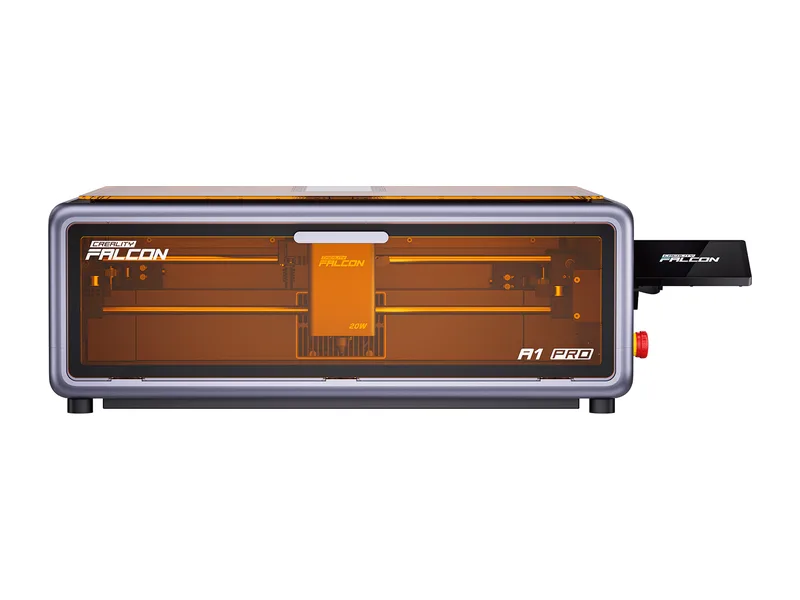
Creality Falcon A1 Pro 20W
Beginners and craft sellers who want an enclosed, app-connected 20W laser with autofocus and camera, and may add metal marking later
from $1,099 at Creality, checked Oct 31
Image: Creality. Prices change often; the shop shows the current price.
Quick verdict
The Falcon A1 Pro is Creality's step up from the Falcon A1: a 20W blue diode in a pre-assembled Class 1 enclosure with CoreXY motion rated at 600 mm/s, a top camera, autofocus, a touchscreen and Wi-Fi app control. Its 'dual-laser' billing refers to an optional 2W 1064 nm IR module for marking metal and plastics, which is not in the $1,099 machine-only box. Creality claims 10 mm basswood and 8 mm black acrylic in one pass; CNX Software got a good result on 10 mm basswood but needed multiple passes and still had to finish the cut by hand. It is easy and safe to run, but the 358 x 268 mm bed is small for the price.
What you still need
The 460 x 346 mm honeycomb panel ($69 alone, or $50 extra in the $1,149 Basic Kit), a window vent run for the exhaust hose or an air purifier (the $1,449 All in One Kit adds the AP1 mini, honeycomb, rotary and IR module), the 2W IR module ($379) if you want to mark bare metal, a rotary kit for tumblers (included in the $1,249 Extension Kit with a honeycomb), a fire extinguisher, and a LightBurn licence if you prefer it to the free Falcon Design SpaceMaterial reality check
Cuts wood, plywood, MDF, bamboo, card, paper, fabric, leather and dark or red-tinted acrylic. Engraves wood, leather, rubber, glass, painted metal and stainless steel surfaces. With the optional IR module it also marks bare stainless, aluminum, brass, silver, gold, titanium and many plastics. The blue diode cannot cut clear or blue acrylic, and nothing on this machine cuts metal beyond thin foil. Never laser PVC or vinyl.Better alternative if
if you mainly cut and engrave wood and want the same 20W class in an enclosure for about $400 less: SainSmart Genmitsu L8 20WScores
Scored on the same scale for every laser on this site. See all lasers ranked.
Specifications
| Laser type | Diode laser |
|---|---|
| Form | Enclosed |
| Optical power | 20 W |
| Other modules | Takes Creality's optional 2W 1064 nm infrared solid-state module for marking bare metal and plastics, swapped without tools. Despite the 'Dual-laser' product name it is not in the $1,099 machine-only box: it costs $379 alone or $140 extra in the $1,239 Dual Laser Kit |
| Wavelength | 455 ± 5 nm (optional IR module: 1064 ± 1 nm) |
| Work area | 358 × 268 mm |
| Max speed | 600 mm/s (maker claim) |
| Cutting (maker claim) | 10 mm basswood and 8 mm black acrylic in one pass, 0.04 mm stainless sheet (maker claims) |
| Precision | <0.3 mm (<0.012 in) autofocus height measurement (maker claim); motion accuracy not published |
| Air assist | Included |
| Camera | Yes |
| Autofocus | Yes |
| Rotary support | Yes |
| Safety | Class 1 (FDA) enclosure with lid-open stop, dual flame detection (camera and infrared sensor) with app alerts, tilt and drop stop, airflow monitoring, emergency stop button and key lock |
| Connectivity | USB-C, Wi-Fi (2.4 GHz), USB drive (offline) |
| Software | Falcon Design Space, LightBurn, LaserGRBL |
| Weight | 16.8 kg |
| Price | from $1,099 at Creality, checked Oct 31 |
Pros and cons
Why we like it
- Autofocus by camera and red-dot ranging, so no focus block for normal jobs
- Class 1 enclosure with dual flame detection that stops the job and alerts your phone, plus tilt stop and key lock
- Touchscreen, Wi-Fi app control and USB drive jobs, so it runs without a computer tethered to it
- Arrives pre-assembled with the air assist pump in the box, and setup takes minutes
- Accepts Creality's 2W 1064 nm IR module for marking bare metal and plastics, swapped without tools
Watch out for
- The 'Dual-laser' name oversells the base listing: the 2W IR module is not included at $1,099 and costs $379 on its own
- $1,099 for 20W optical is steep: $400 more than the 20W Genmitsu L8, and $600 short of the 40W xTool S1
- 358 x 268 mm bed is smaller than the cheaper Falcon A1's 305 x 381 mm
- Limited Z clearance: CNX could not fit a honeycomb under 10 mm stock, and the honeycomb is not included
- CNX's 10 mm basswood cut (7 passes at reduced power to limit charring) still did not fully separate, and we found no independent test of the one-pass claim
Compare with
Frequently asked questions
What materials can the Creality Falcon A1 Pro 20W cut and engrave?
Cuts wood, plywood, MDF, bamboo, card, paper, fabric, leather and dark or red-tinted acrylic. Engraves wood, leather, rubber, glass, painted metal and stainless steel surfaces. With the optional IR module it also marks bare stainless, aluminum, brass, silver, gold, titanium and many plastics. The blue diode cannot cut clear or blue acrylic, and nothing on this machine cuts metal beyond thin foil. Never laser PVC or vinyl.
What else do I need to buy with the Creality Falcon A1 Pro 20W?
The 460 x 346 mm honeycomb panel ($69 alone, or $50 extra in the $1,149 Basic Kit), a window vent run for the exhaust hose or an air purifier (the $1,449 All in One Kit adds the AP1 mini, honeycomb, rotary and IR module), the 2W IR module ($379) if you want to mark bare metal, a rotary kit for tumblers (included in the $1,249 Extension Kit with a honeycomb), a fire extinguisher, and a LightBurn licence if you prefer it to the free Falcon Design Space
How much does the Creality Falcon A1 Pro 20W cost?
From $1,099 at Creality, checked Oct 31.
How we rank: by our own scores for power, speed, ease of use, safety and value, from the maker's published specs and independent tests where they exist. Some links earn us a commission (for example TwoTrees, SainSmart, Gweike and Amazon). That never changes a score or the order of a list (disclosure).
Sources
- Creality Falcon US store: Falcon A1 Pro 20W product page (specifications, box contents, A1 comparison)
- Creality Falcon US store: Falcon A1 Pro product JSON (price)
- Creality Falcon US store: Falcon A1 Pro 20W Dual Laser Kit
- Creality Falcon US store: Falcon 2W Infrared Laser Module
- CNX Software: Creality Falcon A1 Pro review
- The Gadgeteer: Creality Falcon A1 Pro 20W review