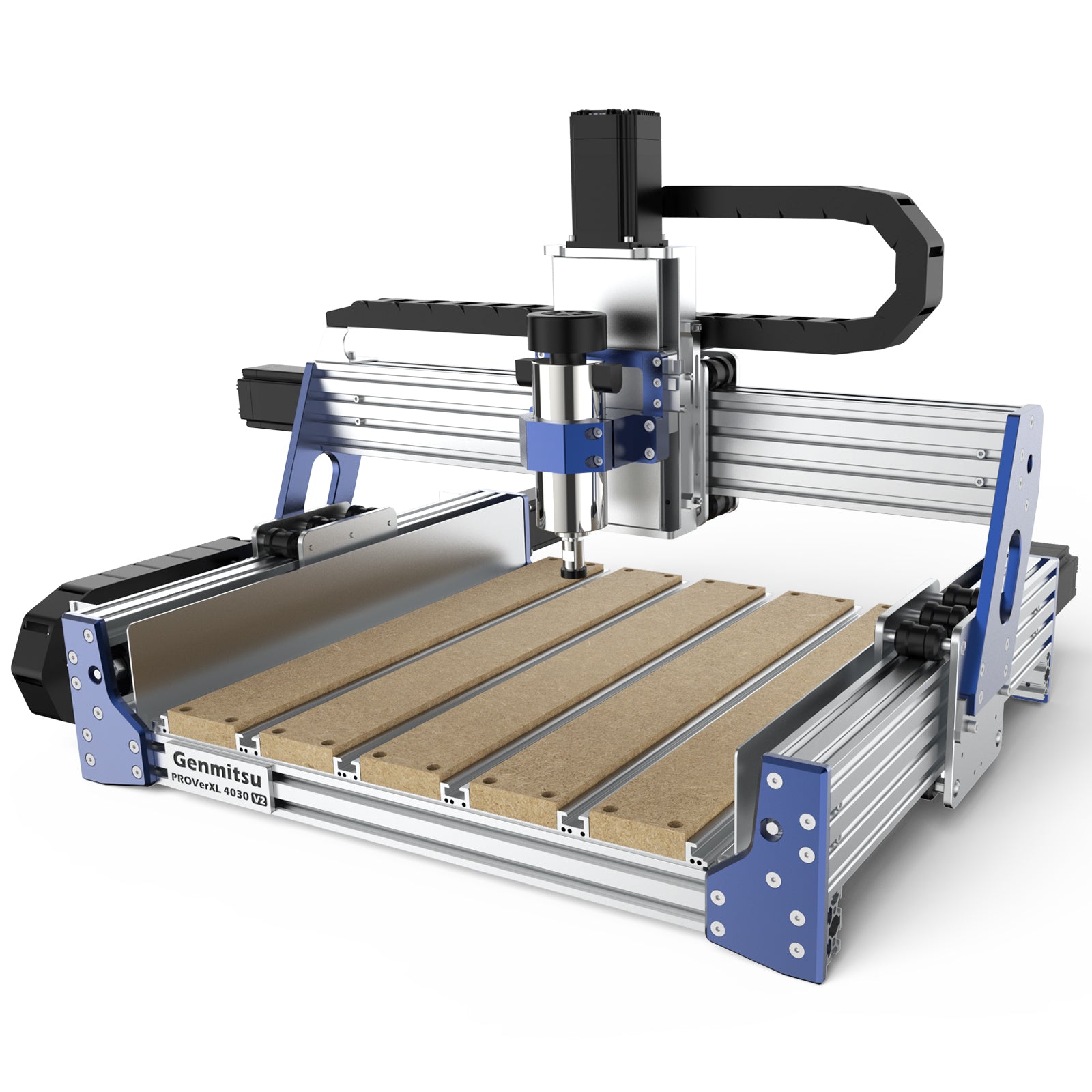
CNC Wasteboard — Design, Materials, and Why Surfacing First
Your CNC machine's bed is probably not flat. You paid $2000+ for the machine, and the table that came with it has 0.3–1mm of variation across a 600mm span. This is not a defect. It's physics. Manufacturing tolerances, shipping vibration, and thermal expansion all add up.
Table of Contents
- The Wasteboard Is Not Optional, And Surfacing It First Changes Everything
- What a Wasteboard Is and Why You Need a Sacrificial Layer
- Why Surfacing Is Your FIRST Job
- Wasteboard Material: MDF Is The Standard
- Flatness Variation in Stock Machines
- Surfacing Bit Selection
- Surfacing Parameters (Speed and Feed)
- How Often to Resurface
- Thickness Management: When to Replace
- Sealing the Wasteboard (Optional but Recommended)
- Threaded Insert Wasteboard: The Setup-Once Option
- Hybrid Wasteboard: T-Track + Threaded Inserts
- Surfacing Workflow (Step by Step)
- Common Mistakes to Avoid
- Real-World Advice from the Community
- Verdict: Surface Immediately, Resurface As Needed
- Shop This Guide
- Related Guides
The Wasteboard Is Not Optional, And Surfacing It First Changes Everything
Your CNC machine's bed is probably not flat. You paid $2000+ for the machine, and the table that came with it has 0.3–1mm of variation across a 600mm span. This is not a defect. It's physics. Manufacturing tolerances, shipping vibration, and thermal expansion all add up.
That flatness variation translates directly into Z-depth inconsistency. On your first 0.5mm v-carving pass, the bit at the center of the span will cut 0.3mm deep, and at the edge it'll cut 0.8mm deep. Your engraving looks uneven. Your edge profile is inconsistent.
The solution is absurdly simple: machine a wasteboard flat relative to your machine's Z-axis, not the floor. Once you do this, every point on the board is at the same Z height from the machine's perspective. Your 0.5mm pass is 0.5mm everywhere.
This is the single most important first job on a new CNC router. I've seen $10,000 machines produce bad results because the operator skipped this step.
What a Wasteboard Is and Why You Need a Sacrificial Layer
A wasteboard is a flat, easily replaceable surface that sits on your machine's bed. It serves three purposes:
- It protects the machine bed from the spindle bit if the work is too thin or missing
- It provides a flat reference surface for workholding (tape, clamps, inserts)
- It can be resurfaced to maintain flatness as it gets divots and wear
Without a wasteboard, your first crash (and you will have one) damages the machine bed permanently. With a wasteboard, you replace a $30 board.
Why Surfacing Is Your FIRST Job
Surfacing means using a flat-bottomed end mill (a "spoilboard cutter") to machine the top surface of the wasteboard flat relative to your Z-axis. The machine makes one slow, even pass and removes ~0.5mm of material across the entire surface.
After surfacing, every point on the wasteboard is at the exact same height as far as the Z-axis is concerned. This is geometric perfection relative to the machine. It doesn't matter what the floor looks like or what gravity thinks—the wasteboard is flat to the machine.
Why you notice the difference immediately:
- Shallow passes are consistent depth (no chatter from varying Z)
- V-carving has uniform line width and depth
- Edge profiling is consistent
- Tape holds uniformly (no low spots where air can creep in)
- Tool deflection is predictable
Before surfacing: You're fighting the geometry of the board. After surfacing: geometry is eliminated, and you're just cutting.
Wasteboard Material: MDF Is The Standard
Why MDF:
- Cheap ($15–30 for a 24×24" sheet)
- Flat and stable when dry
- Easy to resurface (no special equipment)
- Holds threaded inserts reasonably well
- Absorbs vibration better than aluminum
- Easy to modify (drill, pocket, route)
Why NOT:
- Swells and warps in humid conditions
- Moisture is the enemy (sealing helps)
- Eventually gets thin from repeated resurfacing
Standard thickness: 3/4" (19mm) MDF. This is thick enough to hold threaded inserts and resist warping, yet thin enough to resurface without excessive tool wear.
Lifespan: With moderate use and monthly re-tightening of fasteners, a 3/4" MDF wasteboard lasts 1–2 years before divots and wear make replacement worthwhile.
Flatness Variation in Stock Machines
Don't assume your machine table is flat. Common variations:
| Machine Class | Typical Table Flatness | Impact |
|---|---|---|
| Budget routers (sub-$2000) | 0.5–1.0mm over 600mm span | Significant; surfacing is critical |
| Mid-range (Shapeoko, WorkBee) | 0.3–0.5mm over 600mm span | Moderate; surfacing recommended |
| Industrial (Tormach, Haas) | ±0.05mm over 600mm span | Minimal; but still good practice |
Even a $3000 machine benefits from a surfaced wasteboard.
Surfacing Bit Selection
A spoilboard cutter (also called a surfacing bit) is a large-diameter flat-bottomed end mill designed to remove material efficiently in a single pass.
Typical specs:
- Diameter: 22–40mm (most hobby routers use 22, 25, or 32mm)
- Flutes: 2–3 (fewer flutes = better chip evacuation in wood/MDF)
- Material: Carbide (lasts longer in abrasive MDF)
Common recommendation: 22mm or 25mm for most hobby machines. A 32mm bit is overkill for a small router and might chatter.
Where to buy: Amazon has generic spoilboard cutters ($15–30). For premium, Onsrud is the industry standard (~$60–80, but lasts 10×+ longer than cheap bits).
Surfacing Parameters (Speed and Feed)
Unlike a regular cutting pass, surfacing is slow, shallow, and steady.
Typical parameters (adjust for your machine):
- RPM: 12,000 or less. High RPM causes vibration and chatter. 10,000 RPM is safer.
- Feedrate: 100–150 mm/min (very slow compared to normal cutting)
- Depth of cut: 0.3–0.5mm per pass. Even shallower if you see chatter.
- Direction: Climb milling or conventional? Climb is faster but requires precise backlash compensation. Conventional is safer.
Real-world example: A 22mm carbide bit on a 3/4" MDF wasteboard at 10,000 RPM, 120 mm/min feedrate, 0.4mm depth removes material cleanly and finishes flat.
How Often to Resurface
Resurface when:
- Visible divots appear from past cuts (1–2mm deep gouges)
- Z-depth consistency drops noticeably (engraving is uneven)
- Threaded insert holes enlarge and strip (more than 5–10 uses per hole)
Typical schedule: Professional shops resurface monthly. Hobby shops: every 6–12 months depending on use.
Each surfacing pass removes ~0.5mm of material. A 3/4" (19mm) board can handle 30+ surfacing passes before it gets dangerously thin.
Thickness Management: When to Replace
Track your wasteboard thickness:
| Remaining Thickness | Status | Action |
|---|---|---|
| 18–19mm (new) | Perfect | Use normally |
| 16–17mm (after 3–4 surfacings) | Good | Continue using |
| 12–14mm (after 8–10 surfacings) | Fair | Still functional, plan replacement soon |
| < 12mm | End-of-life | Replace immediately (thin boards warp easily) |
When you replace the board, you surface the new one once (5–10 minutes) and you're back to perfect flatness.
Sealing the Wasteboard (Optional but Recommended)
Raw MDF absorbs moisture from the air. In humid environments (>60% RH), an unsealed board swells imperceptibly but measurably. Sealing extends the board's life.
Simple sealing method:
- After the initial surfacing pass, the board is already smooth
- Apply 2 coats of water-based polyurethane or lacquer (Minwax Polycrylic is accessible and cheap)
- Light sand between coats (220 grit)
- Total time: 30 minutes + drying time
Result: The board resists moisture absorption by ~80%. In humid workshops, this extends board life by 50%.
Note: Sealing doesn't prevent all moisture absorption, just slows it. In a truly damp environment, MDF is fighting a losing battle.
Threaded Insert Wasteboard: The Setup-Once Option
The hybrid approach: Instead of resurfacing every 6 months, install a 5×5mm or 10×10mm grid of M5 or M6 threaded inserts across the entire wasteboard. Now you can bolt work directly to the board.
Advantages:
- After initial install, you never reshape the board
- Clamping is flexible (any hole, any orientation)
- No tape residue to clean
- Professional setup
Disadvantages:
- One-time installation (1–2 hours with a drill template)
- Tapping holes that will eventually strip (but threaded inserts can be replaced)
Installation:
- Create a drill template from hardboard (mark your grid)
- Drill through the template into the MDF (5mm holes for M6 inserts)
- Press-fit the threaded inserts into the holes
- Done
Community standard: CNC Zone builders who install threaded inserts report zero regrets. It's a best-practice setup.
Hybrid Wasteboard: T-Track + Threaded Inserts
The best approach combines both:
- T-track channels routed or bolted into the wasteboard (for quick clamp positioning)
- Threaded insert grid for direct-bolt workholding
This gives you maximum flexibility: clamps for some jobs, bolts for others, and both integrated into a single board.
Cost: ~$150 (T-track kit + threaded inserts)
Setup time: ~2 hours (one-time)
Durability: Years; T-track doesn't wear out, inserts can be replaced
Surfacing Workflow (Step by Step)
Before you start:
- New or worn wasteboard, bolt it flat to your machine bed
- Measure flatness with a straightedge (just to confirm the problem)
The pass:
- Load the spoilboard cutter
- Set RPM to 10,000, feedrate to 120 mm/min, depth to 0.4mm
- Jog to a corner of the board
- Start the spindle
- Use a single pass, long enough to cover the entire board length (or make multiple passes, advancing Y between each)
- Watch for chatter; if present, reduce feedrate or RPM slightly
- Measure the result; the board is now flat
Time: ~15 minutes for a 600×600mm board; ~25 minutes for a 1000×1000mm board.
Common Mistakes to Avoid
- Using a small ball-nose bit instead of a flat-bottomed cutter. The ball-nose will leave a wavy surface. Use a spoilboard cutter (flat bottom).
- Surfacing too fast. The speed/feed defaults for normal cutting are too aggressive for surfacing. Slow down.
- Not cleaning debris between passes. MDF dust clogs the tool. Use compressed air to clear chips periodically.
- Surfacing with a dull bit. A worn bit chatters and burns the surface. Replace bits every 20–30 hours of use.
- Forgetting to surface after a major crash. If you've gouged the board with a deep cut, resurface before the next job.
Real-World Advice from the Community
From CNC Zone:
- "Surfacing the wasteboard was the single best improvement I made to my machine."
- "Don't skip this. Seriously. It's 15 minutes that saves you from frustration forever."
- "Our shop surfaces every 2 weeks. We have zero chatter issues."
From V1 Engineering:
- "LowRider wasteboard surfacing is a game-changer. We recommend it as part of the initial setup."
- "Once you surface, your Z-depth becomes predictable. You'll wonder how you lived without it."
Verdict: Surface Immediately, Resurface As Needed
Your first job after assembly: Bolt down a new 3/4" MDF wasteboard, surface it flat, and start cutting. Total time: 1 hour. Impact on machine performance: transformative.
Ongoing maintenance: Resurface every 6–12 months, or sooner if you notice flatness issues. Each pass takes 20 minutes. It's the cheapest insurance policy you'll buy for your machine.
Long-term approach: Install threaded inserts during the initial wasteboard setup. This gives you a one-time modular surface that works for years with zero reshaping.
The wasteboard is not a consumable you suffer through—it's a critical component that determines whether your machine produces good cuts or frustration. Invest the time upfront, and your machine becomes a precision tool instead of a guessing game.
Shop This Guide
| Item | Price Estimate | Link |
|---|---|---|
| 3/4" MDF Sheet (24×24") | $15–30 | MDF Wasteboard → |
| Spoilboard Surfacing Cutter 22mm | $15–35 | Spoilboard Bit → |
| Carbide Spoilboard Cutter (Onsrud) | $60–80 | Premium Surfacing Bit → |
| Threaded Insert Kit M5 (100 count) | $10–18 | Threaded Inserts → |
| T-Track Aluminum Kit | $40–80 | T-Track Kit → |
| Polyurethane Finish (Minwax Polycrylic) | $8–12 | Wood Sealer → |