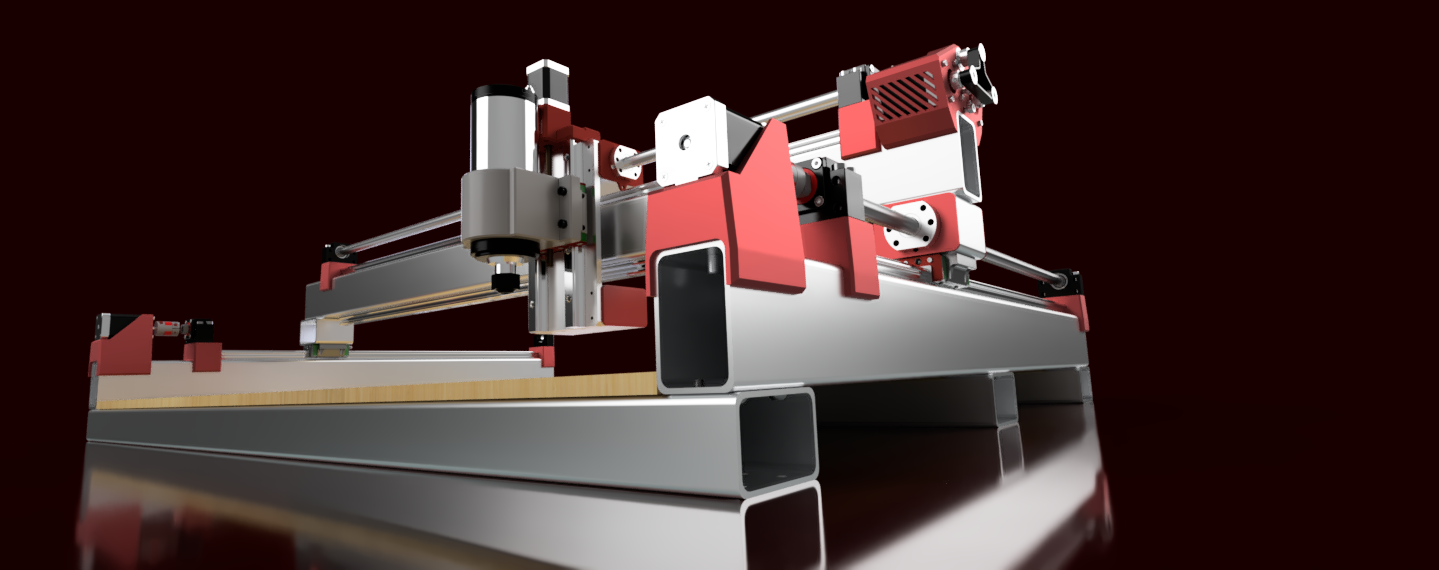
PrintNC Build Guide: Rigid Steel CNC Without Welding
PrintNC is an open-source DIY CNC router made from steel tube that you drill, tap and bolt together. No welding. This guide covers the current V4 design, which size to build, what goes into it and what to buy, checked against the project's own documentation.
Table of Contents
What PrintNC is
PrintNC is a community project, not a company. The design is open source and documented on the PrintNC wiki, which the project itself calls a work in progress. Day-to-day help happens on the PrintNC Discord (over 11,000 members) and on r/printnc.
The frame is rectangular steel tube. You drill and tap the tubes and bolt them together with M6 bolts; the wiki asks for at least three full threads in the steel. The 3D printed parts are drilling guides and assembly jigs that put every hole in the right place, plus motor mounts and a few holders. The rails, ballscrew supports and spindle mount to steel or aluminium, so the plastic does not carry the cutting loads.
The current version is V4, released in February 2024 with the Fusion 360 model rebuilt from scratch. Plenty of V2 and V3 videos, printed parts and part lists are still online. Do not mix them into a V4 build.
There is no official kit to buy right now. The project's kit store (Three Design) has closed and the wiki says the main hardware is self-sourced while new suppliers are set up. That is why this page ends with a full parts list.
Which PrintNC to build
V4 comes as three presets in the same CAD model. You pick one, then set your own dimensions.
| Preset | Cutting area | Carriages and steel | Best for |
|---|---|---|---|
| Desktop | Ideally 300 x 300 to 575 x 575 mm | Lighter build; a hybrid with 50 x 75 mm gantry tube stretches X to about 800 mm | Small shops and smaller parts |
| Metalcutter | 600 x 600 to 1000 x 1000 mm (preset about 625 x 625 mm) | Dual carriages on every axis, larger rails and steel | Aluminium-focused machines |
| Woodcutter | Preset 1275 x 625 mm (50 x 25 in) | Single carriages; essentially V3 with refinements | Wider sheet work; aluminium needs more care |
| PrintNC Mini | About 270 x 300 x 98 mm travel (V47 example) | Separate community design: 50 mm tube, HGR15, NEMA17 | See the Mini guide |
Size limits from the wiki worth knowing before you plan:
- Below 600 mm in Y you get less than 300 mm of usable length, under half the machine.
- From a 1500 mm gantry, move up to 100 x 50 mm (4 x 2 in) steel.
- From 1500 to 1800 mm, use 2010 ballscrews to offset sag and whip.
- Over 1800 mm you need a custom drive: rotating nuts with mid supports, or rack and pinion.
What goes into a V4
Frame
The default tube is 75 x 50 x 3 mm hot or cold rolled steel (for example A513). Walls of 3 to 5 mm work if you enter them in the model; the wiki does not recommend thin 2 mm tube for threaded parts. The Metalcutter gantry is 75 x 75 x 4 mm, or 100 x 75 x 4 mm once the gantry is over 1200 mm. Tube lengths come from the cut list of your configured model; a 625 mm cutting area is not a 625 mm tube.
Printed parts
Export them from your own V4 model after entering the measured wall thickness and corner radius of your steel. The wiki suggests PLA for most parts because it is stiffer than PETG, and PETG for the motor mounts because it copes better with heat.
Rails and ballscrews
- X and Y rails: HGR20 rails with HGW20CC flanged blocks, two blocks per rail. Not MGN12.
- Z rails: either an HGR20 pair with HGW20CC blocks, or two HGR15 rails with four HGH15CA blocks, depending on the Z you choose in the model.
- X and Y ballscrews: SFU1610 (16 mm, 10 mm lead), one for X and one per Y side. A 1605 screw needs twice the motor speed for the same feed, which is why 1610 is the default.
- Z ballscrew: SFU1204 (12 mm, 4 mm lead), length from your Z assembly.
- Supports: BK12 fixed and BF12 floating supports for 1610 (HM12-57 motor mounts can replace the BK12). These hold the screw shaft; the ball nut needs its own housing.
Motors, drivers and power
A V4 has four NEMA23 steppers: X, Y1, Y2 and Z. Each side of the gantry has its own motor and home switch, so the controller can square the gantry every time it homes. The documented baseline is open-loop motors of about 3 A with one StepperOnline DM542T driver each; closed-loop sets are an option, not a requirement.
The wiring example uses a 48 V Mean Well supply (LRS-350-48 or RSP-320-48) set to about 45 V for the motors, plus a separate 24 V supply for the controller and fans. Size the motor supply from the motors you actually buy.
Controller
The wiki recommends grblHAL on a Flexi-HAL or GRBLHAL2000 board, with ioSender on the PC. LinuxCNC with a Mesa card is the main alternative. Whatever you pick needs four independent motor channels and separate Y1 and Y2 homing inputs. Our controller software comparison explains the trade-offs.
Spindle
Most builds use a water-cooled 80 mm spindle with a VFD; the G-Penny spindles are a popular choice, at 1.5 or 2.2 kW. A Makita RT0701C or DeWalt DWP611 router with its own mount also works. The wiki advises against Vevor spindles for this machine. If your mains is 120 V and the spindle is 240 V, you need a VFD made for 120 V in and 240 V three-phase out; a generic 120 V VFD is not the same thing. More in our spindle guide.
How a build goes
- Plan in CAD. Pick the preset, set your size and enter the measured dimensions and corner radii of the steel you can buy.
- Generate the parts and cut lists. The PrintNC BOM generator reads your model; have the steel cut to length by a supplier if you can.
- Print the guides and mounts from the same model.
- Drill, tap and bolt the frame using the printed guides.
- Fit rails and ballscrews, then square and align the gantry.
- Build the electrical cabinet: supplies, drivers, controller, E-stop and contactor, motor and sensor wiring, VFD.
- Configure the controller, home and square the machine, then tram the spindle.
The V4 assembly pages on the wiki walk through each stage. Ask on the Discord before you order anything you are unsure about; it is much cheaper than a wrong ballscrew.
Buying mistakes that cost money
- Ballscrew ends. Order screws machined for your supports (BK12/BF12 for 1610) and send the seller the drawing. Get the total-length convention in writing.
- The wrong rails or blocks. MGN12 instead of HGR20, narrow HGH blocks instead of flanged HGW20CC, or a rail kit with one block per rail when you need two.
- Coupler bores. X and Y couplers go from an 8 mm motor shaft to a 10 mm screw end (12 mm with 2010).
- An undersized motor supply. The wiki's rule of thumb is 0.66 x the total motor phase current. Four 3 A motors give about 7.9 A, a little over the 7.3 A of an LRS-350-48.
- Driver revisions. The current DM542T (V4.0) takes 18 to 50 V DC. Older versions differ, so read the manual for the one you receive.
- VFD voltage. Input must match your mains, output must match the spindle.
- Sensors. NPN or PNP, normally closed or open: match the controller inputs.
- Mixing versions. V3 printed parts and V3 lengths do not fit a V4 model.
Should you build one?
PrintNC is a big project. The wiki's own start page calls it a complex build that needs mechanical and electrical skills: you cut, drill and tap steel, wire a cabinet with mains power and configure a controller yourself. There is no company behind it, so support is the community.
In return you get a steel machine sized to your shop, with the parts list in your hands and nothing you cannot repair. If you would rather buy a finished machine, see our best CNC routers for aluminum and best DIY CNC kits. Our PrintNC review page scores it against both.
PrintNC questions
Does a PrintNC need welding?
No. The steel tubes are drilled, tapped and bolted together with M6 bolts, using 3D printed drilling guides.
What is the current PrintNC version?
V4, released in February 2024. It comes as Desktop, Metalcutter and Woodcutter presets in one Fusion 360 model.
Which rails and ballscrews does a PrintNC V4 use?
HGR20 rails with HGW20CC blocks on X and Y, SFU1610 ballscrews on X and Y with BK12/BF12 supports, and an SFU1204 screw on Z. Gantries from 1500 to 1800 mm move to 2010 screws.
Can I buy a PrintNC kit?
Not from the project at the moment. The kit store closed and the wiki says parts are self-sourced for now; the parts list on this page covers what to buy.
Which controller does PrintNC use?
The wiki recommends grblHAL on a Flexi-HAL or GRBLHAL2000 board, with LinuxCNC and a Mesa card as the main alternative.
PrintNC V4 parts list
What you buy for a PrintNC V4 Metalcutter, the standard steel-frame build. Lengths of steel, rails and ballscrews come from the cut list of the CAD model you configure, so every length below says where it comes from instead of guessing a number. Check the PrintNC wiki before ordering: the documentation, not this list, is the reference.
Decide these first
- Size: Metalcutter (about 625 x 625 mm) or Woodcutter (about 1275 x 625 mm). Their rails, steel and Z parts differ.
- Z variant: one HGR20 rail pair with HGW20CC blocks, or two HGR15 rails with four HGH15CA blocks.
- Ballscrews: SFU1610 is the default; above 1,500 mm use 2010 with BK15/BF15 supports and matching couplers.
- Motors: open-loop NEMA23 with DM542T drivers is the documented baseline; closed-loop packages need matching wiring and controller inputs.
- Spindle: water-cooled 80 mm, 1.5 or 2.2 kW, with a VFD matched to your mains and the spindle; or a Makita RT0701C or DeWalt router with its own mount.
| Part | What to buy | Qty | Where to look |
|---|---|---|---|
| Frame | |||
| Base steel tube Buy cut to length from a local steel supplier. Lengths come from the CAD cut list; 625 mm of travel is not a tube length. | Rectangular steel tube 75 x 50 x 3 mm (other 3 to 5 mm walls work if set in CAD) | 3 cross members + 2 side members | Buy to the spec (local supplier or CAD) |
| Gantry tube Use the gantry length from CAD, not the cutting width. | Square steel tube 75 x 75 x 4 mm (100 x 75 x 4 mm for gantries over 1,200 mm) | 1 | Buy to the spec (local supplier or CAD) |
| Rollers, lower angle, braces Match section, angle thickness and inside radius to the carriage clearance. | Steel roller tube and 6063 aluminium (or steel) angle, sized in CAD | 2 Y rollers + parts from CAD | Buy to the spec (local supplier or CAD) |
| Z plate and tramming plate Plywood plates are a documented way to start; mill the metal ones on the machine later. | Machined aluminium plates from the V4 Z assembly drawing | 1 set | Buy to the spec (local supplier or CAD) |
| Printed parts | |||
| Guides, risers, motor mounts Do not reuse V2 or V3 files. Enter the measured tube radii before printing. | Exported from your V4 model: PLA for drill guides, PETG for motor mounts | 1 full set | |
| Motion | |||
| X and Y linear rails Not MGN12 and not the narrow HGH20 block. Many 'rail kits' include only one block per rail. | HGR20 rails with HGW20CC flanged blocks, two blocks per rail | 4 rails + 8 blocks | |
| Z linear rails Choose the Z variant in CAD before ordering; lengths come from that model. | The Z variant you chose: HGR20 + HGW20CC, or 2 x HGR15 + 4 x HGH15CA | 2 rails + blocks | |
| X and Y ballscrews Send the seller the end-machining drawing. Over 1,500 mm use 2010 to avoid whip. | SFU1610 (16 mm, 10 mm lead), C7 rolled, single nut, ends machined for BK12/BF12 | 3 screws + 3 nuts | |
| Z ballscrew Length from your Z assembly; the 300 mm figure on the wiki is for V2.1. | SFU1204 (12 mm, 4 mm lead) with nut, end machined for BK10 | 1 screw + 1 nut | |
| X and Y screw supports HM and BK are alternatives, not both. Check the seller's shaft-end drawing. | BK12 fixed + BF12 floating supports (or HM12-57 motor mounts instead of BK12) | 3 fixed + 3 floating | |
| Z support and nut housing Some Z designs print or mill the housing; do not buy a second one. | BK10 (or HM10-57) and a 1204 nut housing with 22 mm bore if your Z uses one | 1 + 1 | |
| Motor couplers Check both bores against your motor shaft and the machined screw end. | D30 L40, 8 to 10 mm bores for X/Y (8 to 12 mm with 2010 screws); D25 L30, 8 to 8 mm for Z | 3 + 1 | |
| Cable carriers Choose the cables first, then the chain section and bend radius. | Drag chains for X and Y, sized to your cable bundle and bend radius | 2 runs | |
| Electronics | |||
| Stepper motors Check shaft diameter and length, phase current and inductance. | NEMA23 bipolar, about 3 A per phase, 8 mm shaft (X, Y1, Y2, Z) | 4 | |
| Stepper drivers Set the RMS current to your motor and use the manual for the revision you receive. | StepperOnline DM542T, 18 to 50 V DC, one per motor | 4 | |
| Controller Needs four independent motor channels for auto-squaring the gantry. | Flexi-HAL or GRBLHAL2000 (grblHAL) with separate Y1/Y2 homing, or LinuxCNC with a Mesa card | 1 + a PC | Buy to the spec (local supplier or CAD) |
| Motor power supply The wiki's own rule (0.66 x total motor current) gives about 7.9 A for four 3 A motors, a bit over the LRS-350-48's 7.3 A. Pick a larger 48 V supply if you want headroom; turning it down to 45 V does not add current. | 48 V supply; the wiki's wiring example uses a Mean Well LRS-350-48 or RSP-320-48 set to about 45 V | 1 | |
| Control power supply Never run the controller from the 45 V motor supply. | Mean Well 24 V, 100 to 200 W, for controller and fans | 1 | |
| Homing sensors NPN vs PNP and NC vs NO must match your controller inputs. | M8 NPN normally-closed inductive sensors | 4 (X, Y1, Y2, Z) | |
| Cabinet, E-stop, contactor Size the contactor and protection to your mains supply. | Cabinet of at least 400 x 600 x 200 mm with DIN rail, terminals, E-stop, contactor and filtered fans | 1 set | |
| Cables Lengths from your cable routing; check the flex rating for moving runs. | Continuous-flex 4-core motor cable, shielded VFD spindle cable, signal cable, ferrules | 4 motor runs + spindle + sensors | |
| Spindle | |||
| Spindle and VFD Check spindle voltage and current against the VFD output, and the VFD input against your mains. The wiki advises against Vevor spindles for this machine. | Water-cooled 80 mm spindle, 1.5 or 2.2 kW (G-Penny is the popular choice), with a matched VFD | 1 + 1 | |
| Spindle clamp and collets Pick the collet family from the spindle you bought, not from its power. | 80 mm three-hole clamp; collets for your spindle (ER20 on the usual 2.2 kW) | 1 + collets | |
| Water cooling Check the pump voltage and the spindle's flow requirement. | Pump, lidded reservoir (a bucket works) and tubing that fits the spindle fittings | 1 set | |
| Hardware | |||
| Fasteners Check lengths against wall thickness and blind-hole depth in the blocks. | Metric screws per CAD, for example M5 x 20 for HGR20 rails and M6 x 12 for HGW20CC blocks | per CAD | |
| Grease and consumables Do not mix incompatible greases on rails and nuts. | NLGI 2 lithium grease with gun, M6 x 1 grease fittings, tapping fluid, threadlocker | 1 each | |
| Tools | |||
| Drills, taps and measuring Supplier-cut steel saves a lot of cutting. | Drill or drill press, 3.3/4.2/5/6.5 mm drills, M4/M5/M6 taps, transfer punch, calipers, crimper | 1 set | |
Based on: PrintNC wiki, V4 assembly, Power supplies. Researched October 2026. "Search" buttons open a search for that exact spec, so compare listings against the spec and checks above; a price is only shown for an exact product found by model number. Some links earn us a commission at no extra cost to you (disclosure).