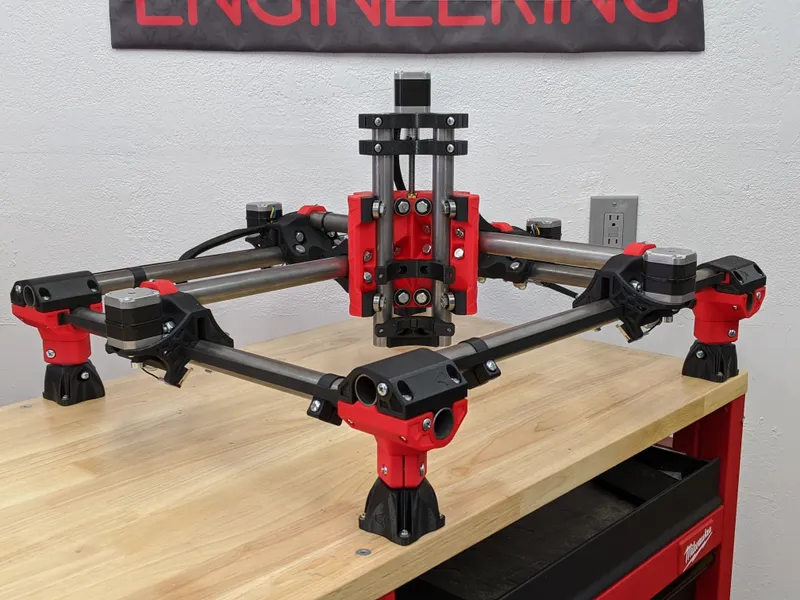
LowRider CNC 3 Build Guide
The LowRider CNC 3 can be sized for full 4 x 8 ft sheets. Its removable gantry travels along a table, which must include room for the wheels, rail and belt mounts as well as the cutting area. Check the LR3 calculator and leave access around the machine.
Table of Contents
- Full-Sheet Cutting Without a Factory-Size Footprint
- Why LowRider Is Different: The Flat Gantry
- LowRider 3 vs LowRider 2: What Changed
- Real Work Area and Practical Limitations
- Who It's For (And Who It's Not)
- Key Specifications and Build Cost Breakdown
- Component Choices You'll Make
- Build Cost Reality
- Strengths: Why People Choose LowRider
- Weaknesses: The Trade-Offs
- The Gantry Sag Problem (And How to Fix It)
- Torsion Box Table Design (4×8 Reference)
- Assembly and Setup Workflow
- Real-World Community Experience
- Verdict: Build One If You Need Full-Sheet Capability
- Shop This Guide
- Related Guides
Full-Sheet Cutting Without a Factory-Size Footprint
The LowRider CNC 3 can be sized for full 4 x 8 ft sheets. Its removable gantry travels along a table, which must include room for the wheels, rail and belt mounts as well as the cutting area. Check the LR3 calculator and leave access around the machine.
A full-sheet LowRider still needs a table larger than the cutting area and enough workshop space to load sheets and reach the machine. Enter your desired cutting area into the LR3 calculator before building the table.
This is the appeal: a machine that can cut large plywood panels and be removed from its table when needed. V1 supplies build documentation and a forum for builders.
Here's what you need to know to decide if it's right for you.
Why LowRider Is Different: The Flat Gantry
Traditional CNC routers have a raised gantry (the structure holding the spindle) that sits on top of a stationary table. The gantry moves X and Y, the table stays fixed. This requires the table to be larger than your work area.
The low gantry spans the work and travels along the table. A single Y rail guides one side, while wheels on the other side run on the table surface. The work remains stationary.
The LR3 can provide full-sheet travel when the table, rail and belts are sized for it. Use the calculator's separate cutting-area and table-size dimensions.
What this enables: Full-sheet cutting of plywood, MDF, and engineered panels. Cabinet builders can cut their entire sheet of parts without repositioning.
LowRider 3 vs LowRider 2: What Changed
LR2 (previous generation):
- Separate YZ gantry plate bolted to the main Y structure
- More assembly steps
- Works, but more joints and complexity
LR3 is the previous generation, released in 2022; LR4 is now the current LowRider:
- Linear guides for Z, a single Y guide rail and a braced X beam
- Cleaner assembly
- Easier to square and adjust
- 3D-printed mounting bracket for the spindle
Practical difference: LR3 is simpler to build and align. If you're choosing between used machines, LR3 is the better choice, but LR2 machines are still excellent.
Real Work Area and Practical Limitations
Work area: chosen by the builder, including full 4 x 8 ft sheet capacity
Full-sheet travel is possible with the correctly sized table
Z size: V1 recommends keeping it at 80 mm; tool reach and stock clearance must be checked separately
Keep the Z assembly short for rigidity. Stock height, cutter reach and required cutting depth determine whether a job fits. A drop table can accommodate thick work without extending the Z assembly; shallow 3D carving is possible.
A torsion box is one option for a stable table. V1 also allows simpler tables with a suitable flat running surface. Use the LR3 calculator and the linked parametric table plans for your build.
Who It's For (And Who It's Not)
LowRider is perfect for:
- Cabinet makers and furniture builders
- Sign shops and engraving
- Anyone needing to cut full sheets efficiently
- Hobbyists with large format projects
- Mobile setups (can be moved off the table)
LowRider is NOT ideal for:
- Deep 3D carving that needs more tool reach or cutting depth than the low Z arrangement provides
- Aggressive aluminum milling on a large build: check rigidity and cutting demands carefully
- Small parts needing careful workholding and fine tooling still require the same setup care as on smaller routers
- Multi-tool production runs (slow tool changes without a fixed station)
Key Specifications and Build Cost Breakdown
| Spec | Value | Notes |
|---|---|---|
| Work Area | 4×8 ft (full sheet) | Full-sheet travel is possible with the correctly sized table |
| Z Clearance | 80 mm recommended Z size | Usable depth depends on tool reach and setup |
| Y Rail Quantity | 1 guide rail | Choose a listed rail-block diameter to match the measured Y tube OD |
| Drive System | NEMA17 motors (5 total) | 2 Y, 2 Z, 1 X; integrated control |
| Z-Axis Structure | Four MGN12H linear guides, plates and printed parts | Two T8 leadscrews with matching nuts |
| Controller | SKR Pro, Jackpot, or Duet 3 | Firmware must match the board; V1 uses Marlin or FluidNC configurations |
| Spindle | Makita RT0701C typical | 1.25 HP router, excellent community support |
| Build Time | Build-dependent | Varies with printing speed and experience |
| Build Cost | $400–600 | Excluding table (~$200 additional) |
Component Choices You'll Make
Linear Guides: The Standard MGN12H Z Setup
The LR3 BOM calls for four 150 mm MGN12H rail assemblies for Z. The X carriage rides on bearings along round tubes in the braced beam. MGN15 rails are not a drop-in substitution.
Budget for the four short Z rail assemblies specified in the BOM, including matching carriages
Use the listed MGN12H assemblies and check smooth motion before installation
Drive: Leadscrew vs Ballscrew
LR3 uses two T8 leadscrews for Z and GT2 belts for X and Y. RM1605 ballscrews would require a redesign of the mounts and drive arrangement.
For Z, buy leadscrews and nuts that match the official BOM and build height
Motors: NEMA17 vs NEMA23
LowRider uses NEMA17 motors throughout. They're adequate for the work and the footprint is small.
NEMA23 upgrades exist but are overkill and heavier. Stick with NEMA17 unless you're planning extreme cutting forces (which LowRider isn't designed for).
Controller Options
Documented controller choices:
- SKR Pro 1.2: V1 documents it with Marlin firmware and a wired display
- Jackpot: a V1-supported controller using FluidNC, with configuration and operation through a web interface
- FluidNC (open-source GRBL variant): Free firmware; runs on various boards.
Mach3 / Mach4 (less common):
- Windows-only software
- More powerful for multi-axis control but overkill for LowRider
- Steeper learning curve
V1's controller documentation recommends Jackpot; SKR Pro remains a documented Marlin option for users who want that interface
Spindle: Makita RT0701C
The community standard. Why?
- Cheap ($70–90)
- A compact trim router with widely available compatible mounts
- Excellent dust shoe designs exist specifically for it
- Good speed control (10,000–30,000 RPM)
- Smaller than industrial spindles, fits the gantry
Alternatives:
- DeWalt DWP611: needs its own 69 mm mount rather than the Makita's 65 mm mount
- A heavier VFD spindle requires an LR3-compatible mount and a check of gantry loading and clearance
- Makita plunge router (bigger, overkill)
Recommendation: use a router supported by the LR3 mount files and suitable for your mains supply
Build Cost Reality
Core machine (~$400–500):
- Printed parts (filament cost): $30–50
- Hardware kit (bolts, nuts, etc.): $50–100
- Round tubing for two X rails and one Y guide rail, sized with the LR3 calculator
- Four 150 mm MGN12H rail assemblies with matching blocks for Z
- Motors + drivers: $80–120
- Controller (SKR Pro): $60–80
- Makita router: $70–90
Table (~$150–200):
- 2×4 lumber and plywood: $100–150
- Hardware: $30–50
Total: ~$550–700 for a complete machine ready to cut.
Compare to commercial machines:
- Shapeoko Pro: $2000+
- Haas TM-1: $30,000+
- Used Shopbot: $5000+
LowRider is the value play.
Strengths: Why People Choose LowRider
- Large format. Full-sheet cutting is transformative if you need it.
- Portable. Can be moved off the table and stored. (Try that with a Haas.)
- Cost. $600 complete machine vs $2000+ for commercial equivalents.
- Community. V1 Engineering forums are active, build logs abound, documentation is excellent.
- Documented: the official build guide and public build logs show completed machines
- Modular. You can upgrade components (rails, motors, spindle) as you go.
Weaknesses: The Trade-Offs
- Z depth: keep the assembly low and check cutter reach; a drop table can help with thick stock
- Gantry rigidity: a wider beam is more demanding; check the struts, joints and observed depth variation on your build
- Follow the documented braced-beam assembly before considering structural modifications
- Spindle positioning. The spindle sits on the edge of the Z assembly; side-load forces are non-ideal. Fine for wood, not ideal for aggressive aluminum.
- Assembly time: allow for printing, parts preparation, alignment, wiring and test cuts
- Support: start with V1's documentation and forum, and check the seller's support arrangements for purchased parts
The Gantry Sag Problem (And How to Fix It)
The LR3 beam uses two round X rails, printed braces and strut plates. If depth varies across the table, check beam assembly, table support, spindle tram and Z alignment before assuming a single tube is sagging.
Mitigation:
- Check that all strut plates and braces are installed and secure before diagnosing beam flex
- A different beam section requires a redesigned carriage and structure; no beam completely eliminates elastic deflection
- Surface the spoilboard after assembly and alignment; this can compensate for repeatable height variation but cannot remove load-dependent flex
Measure the machine first, then decide whether surfacing or a mechanical adjustment addresses the observed error
Torsion Box Table Design (4×8 Reference)
A torsion box is a hollow structure (like a sandwich): two thin plywood skins with a grid of internal webbing. It's extremely rigid, lightweight, and flat.
Plan a torsion-box table using the linked V1 plans and your calculated LR3 table dimensions:
- Choose skin thickness from the selected table plan
- Use internal ribs and spacing from the same plan
- Glued and screwed together
- Make the table large enough for the calculator's footprint, including wheel and rail space
- Calculate finished weight from the chosen sheets, ribs and base
- Cost: ~$150–200 in materials
Benefits:
- Flatness depends on the assembly surface, construction and support
- Lightweight (can be moved)
- Absorbs vibration well
- Good for workholding (T-track or tape adhesion)
Community builds: Search "torsion box table" on V1 forums; dozens of builders have documented their construction.
Assembly and Setup Workflow
Rough build order:
- Prepare the table, side assemblies and single Y guide rail
- Assemble the X beam, carriage and Z guides
- Wire the motors, endstops and controller using the selected V1 configuration
- Square, level and test the machine before cutting
Critical steps:
- Square the frame (use a 3-4-5 triangle or laser square)
- Align and support the single Y rail; tension the X and Y belts according to the build guide
- Calibrate stepper motor steps-per-mm (using a ruler and test move)
- Test probe cycle (Z-zero automation)
Documentation: V1 Engineering wiki and assembly videos are excellent. Follow them step-by-step; no surprises.
Real-World Community Experience
Common first-time builder mistakes:
- Incorrect belt tension or a poorly aligned Y guide rail
- Not surfacing the wasteboard (causes Z inconsistency)
- Skipping the calibration step (miscalibrated steps-per-mm)
- Building the table too small for the cutting area, wheel tracks and rail mounts
Verdict: Build One If You Need Full-Sheet Capability
If you need full-sheet routing, compare the current LowRider 4 with an existing or planned LR3 build. For LR3, use its own BOM and calculator and budget for the table, router, electronics and dust extraction.
If you're curious but don't have large projects: Start with a smaller format (MPCNC, Shapeoko) first. LowRider is a big commitment.
If precision aluminum cutting is your goal: PrintNC is better suited (smaller, stiffer, but smaller format).
The official instructions and public build logs show how LowRiders are assembled and used. Choose the design and size that fit your work, then validate the completed machine with test cuts.
Shop This Guide
| Item | Price Estimate | Link |
|---|---|---|
| Hardware Kit (official, V1 shop) | $80–120 | V1 Engineering Official Shop (non-affiliate) |
| 3D Printed Parts (print service) | $50–100 | Printed Parts on PrintNinja → |
| SKR Pro Controller Board | $50–70 | SKR Pro 1.2 → |
| NEMA17 Motor Pack (5) | $35–60 | NEMA17 Stepper Motors → |
| Makita RT0701C Router | $70–95 | Makita RT0701C → |
| EMT Conduit & Fittings | $40–60 | EMT Tubing Kit → |
| Linear Rails & Carriages | $150–200 | |
| Ballscrew Set (RM1605) | $40–70 | |
| Plywood & Lumber (table) | $100–150 | Local lumber supplier (buy locally) |
Parts for this guide
If you are buying after reading this, these are the specs to look for.
| Part | What to buy | Where to look |
|---|---|---|
| LR3 Z linear guides The builder needs all four Z guides to assemble and align both sides of the gantry. | Four 150 mm MGN12 rails, each with an MGN12H carriage, matching the LR3 printed parts and mounting holes. | |
| LR3 belts and drive pulleys The builder needs the correct belts and pulleys to drive X and both sides of Y. | Fiberglass-reinforced GT2 belt, 2 mm pitch and 10 mm width, cut to the LR3 calculator; three 16-tooth pulleys for 10 mm belt and 5 mm motor shafts. | |
| LR3 roller bearings The builder needs the roller bearings for the rail and beam assemblies. | 14 sealed 608-2RS bearings, matching the official LR3 BOM. | |
| LR3 NEMA17 motors The machine needs separate motors for X, both Y drives and both Z drives. | Five NEMA17 motors with 5 mm shafts at least 20 mm long, matched to V1's motor and driver specification. |
"Search" buttons open a search for that exact spec, so compare listings against it before buying. Some links earn us a commission at no extra cost to you (disclosure).