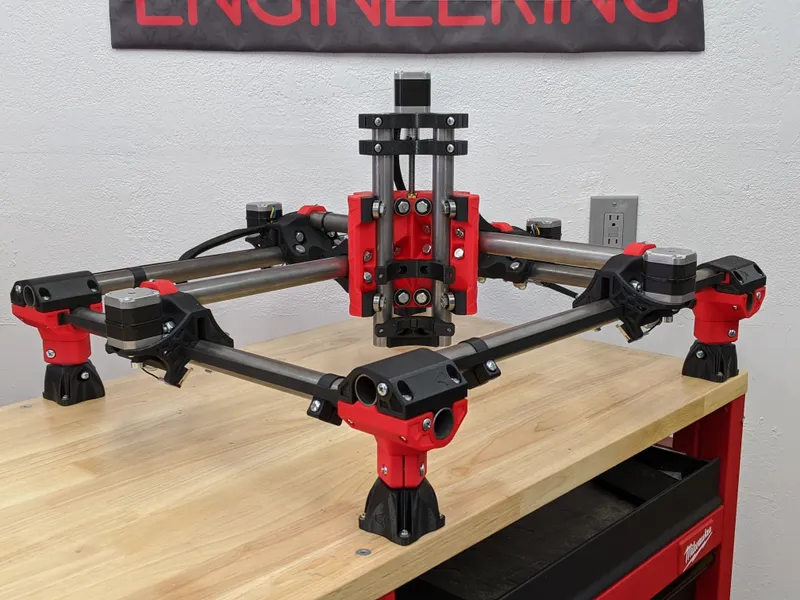
MPCNC vs LowRider vs PrintNC — Which DIY Build Should You Actually Make?
These three machines dominate the open-source CNC community. They're not interchangeable. MPCNC is the entry point. LowRider handles sheets. PrintNC cuts aluminum. Pick the wrong one and you'll spend a year wishing you'd picked another. Pick the right one and you'll build something genuinely useful.
Table of Contents
- The Decision Matrix
- MPCNC Primo: The Entry Point
- LowRider CNC 3: The Sheet Router
- PrintNC: The Aluminum Mill
- Side-by-Side Comparison Table
- Decision Trees
- Material Suitability
- Upgrade & Expansion Reality
- Total Cost of Ownership
- Verdict: The Recommendation Matrix
- The Uncomfortable Truth
- Shop This Guide
- Related Articles
These three machines dominate the open-source CNC community. They're not interchangeable. MPCNC is the entry point. LowRider handles sheets. PrintNC cuts aluminum. Pick the wrong one and you'll spend a year wishing you'd picked another. Pick the right one and you'll build something genuinely useful.
This is a direct, opinionated guide. No hedging. Real tradeoffs. Real recommendations.
The Decision Matrix
Before diving into specs, ask yourself three questions:
- What's your primary material?
- Wood, foam, acrylic, MDF → MPCNC or LowRider
- Aluminum, composites, precision parts → PrintNC
- What's your primary constraint?
- Budget ($350–500) → MPCNC
- Space (none, need to use walls) → LowRider
- Rigidity (precision matters) → PrintNC
- How much documentation support do you want?
- Polished wiki with step-by-step → MPCNC or LowRider (V1 Engineering)
- Community Discord with real people → PrintNC
- YouTube build series → any of them
MPCNC Primo: The Entry Point
Best for: first CNC build, learning machining fundamentals, wood/foam/acrylic work, small work area (under 600×600mm), budget under $600
Philosophy: accessibility over perfection. Cheap, learnable, proven by thousands. If you're asking "should I build a CNC?" the answer is "start with MPCNC Primo."
| Aspect | MPCNC |
|---|---|
| Typical Work Area | 300×300 to 600×600mm |
| Frame Material | Aluminum EMT conduit + hardware |
| Rail System | V-wheels on extrusion or bearings on rod |
| Drive | Lead screws (ACME) |
| Motors | NEMA17 (X, Y) + NEMA17 (Z) |
| Spindle | Makita RT0701C (you source) |
| Build Cost | $350–500 |
| Precision | ±1–2mm typical, ±0.5mm achievable |
| Rigidity | Good (lighter loads) |
| Best Cuts | Wood, foam, acrylic, MDF |
| Aluminum Capability | Barely (0.5mm depth, slow, risky) |
| Assembly Time | 60–80 hours |
| Documentation | Excellent wiki (V1 Engineering) |
| Community | Largest, most beginner-friendly |
| Upgrade Ceiling | Moderate (conduit limits maximum stiffness) |
Verdict on MPCNC: If this is your first CNC and you're uncertain about the commitment, MPCNC is the right call. It's cheap enough to test the concept. The community is massive. The documentation is excellent. You will not regret building one. You might outgrow it in a year, but outgrowing a $500 machine is a good problem to have.
LowRider CNC 3: The Sheet Router
Best for: full 4×8 sheet work, cabinet parts, flat panel routing, large flat signs, maker spaces, shops with limited wall space but adequate floor area, material volume over precision
Philosophy: same design roots as MPCNC (V1 Engineering), optimized for large horizontal work. Footprint is the size of the work, not the work + workspace.
| Aspect | LowRider CNC 3 |
|---|---|
| Typical Work Area | Up to 4×8 feet (1220×2440mm) |
| Frame Material | Aluminum extrusion (V-slot or C-beam) |
| Rail System | V-wheels or linear rails (upgradeable) |
| Drive | Lead screws or ballscrews |
| Motors | NEMA23 (typical for full size) |
| Spindle | Makita RT0701C or larger (you source) |
| Build Cost | $400–800 (depends heavily on size) |
| Precision | ±1–2mm typical, ±0.5mm achievable |
| Rigidity | Good (large work area spreads load) |
| Best Cuts | Flat panels, cabinets, signs, plywood |
| Aluminum Capability | Light passes, not recommended |
| Z Clearance | Tight (depends on configuration) |
| 3D Carving | Limited (primarily 2.5D) |
| Assembly Time | 80–120 hours |
| Documentation | Excellent wiki (V1 Engineering) |
| Community | Good (smaller than MPCNC) |
| Upgrade Ceiling | High (can scale to very large sheets) |
Verdict on LowRider: If 50% of your work is "cut me 4 panels from this plywood," LowRider is the machine. It's not better at precision than MPCNC; it's just much better at material volume. Cabinet shops, sign makers, and furniture builders use LowRiders seriously. MPCNC if you want precision. LowRider if you want capacity.
PrintNC: The Aluminum Mill
Best for: aluminum milling, precision parts, small work area that doesn't matter (200–400mm), rigidity-first philosophy, willingness to learn from Discord instead of structured docs
Philosophy: steel tube frame = rigidity per dollar. Accept smaller work area to maximize stiffness. Optimize for materials that demand precision (aluminum, composites, hardened metals).
| Aspect | PrintNC |
|---|---|
| Typical Work Area | 300–700mm (builder-dependent) |
| Frame Material | Steel tube (25–40mm) |
| Rail System | MGN linear rails (ballscrews) |
| Drive | Ballscrews (all axes) |
| Motors | NEMA23 (all axes, required) |
| Spindle | 800W–2.2kW VFD spindle (you source) |
| Build Cost | $800–1,500 |
| Precision | ±0.1–0.2mm easily, ±0.05mm with tuning |
| Rigidity | Excellent (steel tube design) |
| Best Cuts | Aluminum, precision parts, fixtures, jewelry |
| Wood Capability | Yes, but oversized for it |
| Assembly Time | 100–150 hours |
| Documentation | Discord-first (community builds) |
| Community | Good (dedicated, aluminum-focused) |
| Upgrade Ceiling | High (can scale larger) |
Verdict on PrintNC: If aluminum is your primary material or you've outgrown MPCNC and want real rigidity, PrintNC is the answer. It costs more ($800–1,500) and requires more documentation exploration. But the payoff is a machine that cuts aluminum confidently. The community is smaller but more focused. If you're asking "can MPCNC do aluminum?" the answer is technically yes but grudgingly. PrintNC says yes enthusiastically. In CNCRouterInfo's head-to-head comparisons, the PrintNC scores 82/100 on rigidity versus the MPCNC's 35/100 — a gap that directly translates to aluminum cutting capability.
Side-by-Side Comparison Table
| Category | MPCNC | LowRider | PrintNC |
|---|---|---|---|
| Entry-Level Friendliness | ★★★★★ | ★★★★☆ | ★★★☆☆ |
| Cost | ★★★★★ | ★★★★☆ | ★★★☆☆ |
| Work Area | ★★★☆☆ | ★★★★★ | ★★★☆☆ |
| Rigidity | ★★★☆☆ | ★★★☆☆ | ★★★★★ |
| Precision | ★★★☆☆ | ★★★☆☆ | ★★★★★ |
| Aluminum Capability | ★☆☆☆☆ | ★☆☆☆☆ | ★★★★★ |
| Documentation | ★★★★★ | ★★★★★ | ★★★☆☆ |
| Community Size | ★★★★★ | ★★★★☆ | ★★★☆☆ |
| Beginner-Friendly Parts | ★★★★★ | ★★★★☆ | ★★★☆☆ |
| Customization Ceiling | ★★★☆☆ | ★★★★☆ | ★★★★☆ |
Decision Trees
"I'm new to CNC and don't know what I'm doing"
→ MPCNC Primo. Not even a question. It's cheaper, the community is biggest, documentation is best. You'll learn machining fundamentals, prove the concept, and either be happy for a year or know what you want to upgrade to.
"I need to cut a LOT of flat panels"
→ LowRider CNC 3. MPCNC can't physically hold 4×8 material. PrintNC is overkill. LowRider is purpose-built for this. Cabinet makers and sign makers choose LowRider for a reason.
"I mill aluminum regularly; precision under 1mm is required"
→ PrintNC. The other two won't be satisfying. The rigidity difference is real. The cost is higher but justified by capability and repeatability.
"I want the cheapest possible entry to CNC for wood work"
→ MPCNC. No debate. You can build a capable MPCNC for $350–400.
"I have a small shop and need a flexible machine for everything"
→ MPCNC (if small work area is okay) or LowRider (if you have floor space and do panel work). PrintNC if aluminum matters. No single machine wins all categories.
"I'm experienced with tools and want a challenge"
→ PrintNC. It's the most complex build. The reward is a machine that doesn't make compromises. Discord community is responsive to questions.
Material Suitability
| Material | MPCNC | LowRider | PrintNC |
|---|---|---|---|
| Softwood | ✓ Excellent | ✓ Excellent | ✓ Good |
| Hardwood | ✓ Good | ✓ Excellent | ✓ Good |
| Plywood | ✓ Good | ✓ Excellent | ~ Possible |
| Acrylic | ✓ Excellent | ✓ Excellent | ~ Possible |
| MDF | ✓ Excellent | ✓ Excellent | ✓ Good |
| Aluminum | ~ Barely (risky) | ~ Barely (risky) | ✓ Excellent |
| Composites | ~ Possible | ~ Possible | ✓ Good |
| HDPE | ✓ Good | ✓ Good | ~ Possible |
The bottom line: If your material is primarily wood or acrylic, any of these work. If aluminum is in the mix, PrintNC is the only honest choice.
Upgrade & Expansion Reality
MPCNC:
- Can upgrade to ballscrews ($150–200)
- Can migrate to linear rails ($200–300)
- Cannot practically grow beyond ~700×700mm work area (conduit stiffness ceiling)
- Spindle upgrade path exists
LowRider:
- Can upgrade to ballscrews ($200–400)
- Can scale larger (add more material, extend frame)
- Upgrade path is forward-compatible (same platform)
- Can add water cooling, better spindle
PrintNC:
- Can scale larger (build bigger steel frame, longer rails)
- Can upgrade spindle (move from 800W to 2.2kW)
- Already at high precision ceiling; upgrades are tuning, not capability jumps
- Platform supports growing indefinitely
Honest take: MPCNC has an upgrade ceiling. You'll either be happy with it or want to build again. LowRider and PrintNC scale better for future growth.
Total Cost of Ownership
MPCNC Primo (24×24" work area):
- Kit/sourcing: $350–500
- Spindle (Makita): $100
- Controller/PSU: $50
- Bits & consumables: $30
- Total: $530–680 (most affordable)
LowRider CNC 3 (4×8 sheets):
- Kit/sourcing: $400–800 (size-dependent)
- Spindle (Makita): $100
- Controller/PSU: $70
- Bits & consumables: $30
- Total: $600–1,000 (size-dependent)
PrintNC (400×400mm work area):
- Sourcing: $700–1,200
- Spindle (800W VFD): $150–200
- Controller/PSU: $70
- Bits, coolant, etc: $50
- Total: $970–1,520 (most comprehensive)
Verdict: The Recommendation Matrix
| Your Priority | Best Machine | Why |
|---|---|---|
| Lowest Cost | MPCNC | $350–500 entry, proven platform |
| Most Work Area | LowRider | 4×8 capacity, flat panels |
| Best Precision | PrintNC | ±0.05mm achievable, aluminum-capable |
| Largest Community | MPCNC | Thousands of builds, beginner-focused |
| Easiest Assembly | MPCNC | Simplest design, fewest parts |
| Most Rigid | PrintNC | Steel frame, ballscrews, MGN rails |
| Best for Wood | LowRider or MPCNC | Both excellent; choose by work area |
| Best for Aluminum | PrintNC | Only honest choice for rigidity |
| Best Learning Curve | MPCNC | Documented wiki, patient community |
| Best for Production | LowRider | Volume throughput on flat panels |
The Uncomfortable Truth
You might build MPCNC and wish you'd built LowRider in a year. You might build LowRider and wish you'd prioritized precision (PrintNC). You might build PrintNC and decide you actually need bigger work area.
Here's the thing: all three are good machines. The difference is in optimization direction. MPCNC optimizes for accessibility. LowRider optimizes for capacity. PrintNC optimizes for precision.
Pick based on your honest assessment of what you'll actually cut in the next year. Not what you might cut. What you will cut.
Shop This Guide
| Machine | Kit Source | Spindle | Controller |
|---|---|---|---|
| MPCNC | V1 Engineering → | Makita RT0701C → | Any GRBL board ($50–100) |
| LowRider | V1 Engineering → | Makita RT0701C → | Any GRBL board ($50–100) |
| PrintNC | Sourced individually | VFD Spindle 800W → | FluidNC/ESP32 → |