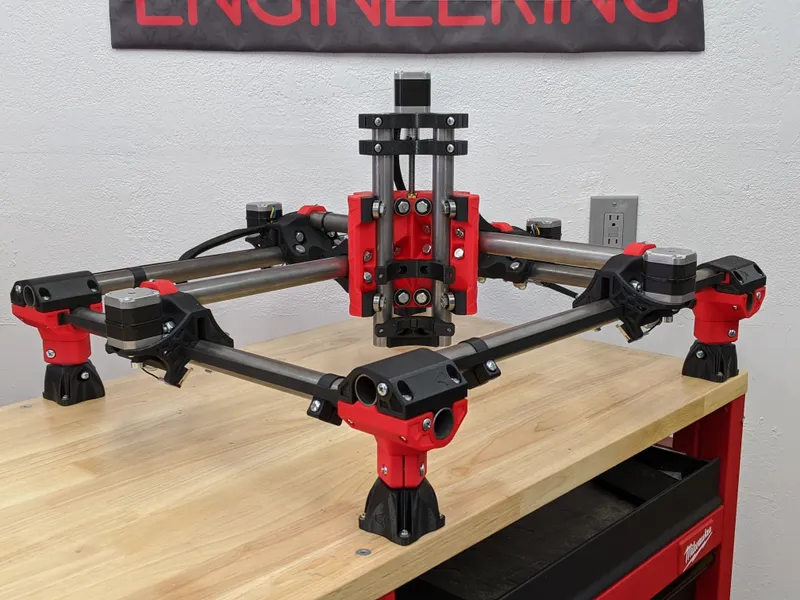
MPCNC vs LowRider vs PrintNC — Which DIY Build Should You Actually Make?
These three DIY CNC designs serve different needs. MPCNC is an accessible compact build, LowRider is built around sheet work, and PrintNC uses a steel frame for greater stiffness. Choose by the parts you want to make, your space and your complete build budget.
Table of Contents
- The Decision Matrix
- MPCNC Primo: The Entry Point
- LowRider CNC 4: The Sheet Router
- PrintNC: The Steel-Frame Router
- Side-by-Side Comparison Table
- Decision Trees
- Material Suitability
- Upgrade & Expansion Reality
- Total Cost of Ownership
- Verdict: The Recommendation Matrix
- The Uncomfortable Truth
- Shop This Guide
- Related Articles
These three DIY CNC designs serve different needs. MPCNC is an accessible compact build, LowRider is built around sheet work, and PrintNC uses a steel frame for greater stiffness. Choose by the parts you want to make, your space and your complete build budget.
This is a direct, opinionated guide. No hedging. Real tradeoffs. Real recommendations.
The Decision Matrix
Before diving into specs, ask yourself three questions:
- What's your primary material?
- Wood, foam, acrylic, MDF → MPCNC or LowRider
- Aluminum, composites, precision parts → PrintNC
- What's your primary constraint?
- Budget ($350–500) → MPCNC
- Sheet capacity and adequate table space: LowRider
- Rigidity (precision matters) → PrintNC
- How much documentation support do you want?
- Polished wiki with step-by-step → MPCNC or LowRider (V1 Engineering)
- Project wiki plus active Discord support: PrintNC
- YouTube build series → any of them
MPCNC Primo: The Entry Point
Best for: first CNC build, learning machining fundamentals, wood/foam/acrylic work, small work area (under 600×600mm), budget under $600
Philosophy: accessibility and learning. MPCNC Primo is worth considering if you want a compact, inexpensive build and are ready to follow its assembly guide.
| Aspect | MPCNC |
|---|---|
| Typical Work Area | 300×300 to 600×600mm |
| Frame Material | Steel EMT conduit or compatible steel tubing, with printed parts |
| Rail System | 608 bearings rolling on steel tubes |
| Drive | Belts on X/Y; leadscrew on Z |
| Motors | NEMA17 (X, Y) + NEMA17 (Z) |
| Spindle | Makita RT0701C (you source) |
| Build Cost | $350–500 |
| Precision | Depends on size, setup and cutting conditions |
| Rigidity | Good (lighter loads) |
| Best Cuts | Wood, foam, acrylic, MDF |
| Aluminum Capability | Possible with suitable tooling and conservative engagement |
| Assembly Time | Varies with printing, sourcing and builder experience |
| Documentation | Excellent wiki (V1 Engineering) |
| Community | Active V1 forum with build and troubleshooting support |
| Upgrade Ceiling | Moderate (conduit limits maximum stiffness) |
Verdict on MPCNC: If this is your first CNC and you're uncertain about the commitment, MPCNC is the right call. It's cheap enough to test the concept. The community is massive. The documentation is excellent. You will not regret building one. You might outgrow it in a year, but outgrowing a $500 machine is a good problem to have.
LowRider CNC 4: The Sheet Router
Best for: full 4×8 sheet work, cabinet parts, flat panel routing, large flat signs, maker spaces, shops with limited wall space but adequate floor area, material volume over precision
Philosophy : V1 Engineering's sheet-routing platform, with a moving gantry on a supporting table. Allow room beyond the cutting area for the mechanism, belts and access.
| Aspect | LowRider CNC 4 |
|---|---|
| Typical Work Area | Up to 4×8 feet (1220×2440mm) |
| Frame Material | Steel-tube gantry with printed parts and strut plates |
| Rail System | Tube-running bearings, table wheels and MGN12H Z guides |
| Drive | Belts on X/Y; two leadscrews on Z |
| Motors | Five NEMA17 steppers |
| Spindle | Makita RT0701C or larger (you source) |
| Build Cost | $400–800 (depends heavily on size) |
| Precision | Depends on table, alignment, tool and cut |
| Rigidity | Depends on span, gantry structure and table support |
| Best Cuts | Flat panels, cabinets, signs, plywood |
| Aluminum Capability | Possible with suitable settings and workholding |
| Z Clearance | Tight (depends on configuration) |
| 3D Carving | 3D carving within available Z travel and tool reach |
| Assembly Time | Varies with printing, table construction and assembly |
| Documentation | Excellent wiki (V1 Engineering) |
| Community | V1 forum support for LowRider builders |
| Upgrade Ceiling | High (can scale to very large sheets) |
Verdict on LowRider : If most jobs start with a full sheet of plywood, its layout makes sense. Choose MPCNC for a compact work area and LowRider for sheet capacity. Precision still depends on the individual build and cutting setup.
PrintNC: The Steel-Frame Router
Best for : builders prioritizing stiffness for aluminum and other routing work, with room and budget for a steel-frame machine. Use the wiki to choose a size and ask the community about revision-specific details.
Philosophy : a steel-tube frame with motion hardware mounted to metal. Size the machine for your projects and required stiffness; wood, plastics and aluminum are all part of its intended use.
| Aspect | PrintNC |
|---|---|
| Typical Work Area | V4 presets: about 625 x 625mm Metalcutter or 1275 x 625mm Woodcutter; customizable |
| Frame Material | Structural steel tube; section depends on V4 preset and span |
| Rail System | HG-series linear guides, including HGR20 XY rails |
| Drive | Ballscrews (all axes) |
| Motors | NEMA23 (all axes, required) |
| Spindle | 800W–2.2kW VFD spindle (you source) |
| Build Cost | $800–1,500 |
| Precision | Build- and operation-dependent; verify with test parts |
| Rigidity | Excellent (steel tube design) |
| Best Cuts | Aluminum, precision parts, fixtures, jewelry |
| Wood Capability | Yes; Woodcutter is specifically aimed at larger routing work |
| Assembly Time | Depends on fabrication, electronics and builder experience |
| Documentation | Project wiki, CAD/BOM tools and community support |
| Community | Good (dedicated, aluminum-focused) |
| Upgrade Ceiling | High (can scale larger) |
Verdict on PrintNC : If regular aluminum work makes stiffness a priority, its steel frame and metal-mounted motion components are worth considering. Budget the complete machine and use the wiki to select the size. A good build still needs alignment, workholding and suitable cutting parameters.
Side-by-Side Comparison Table
| Category | MPCNC | LowRider | PrintNC |
|---|---|---|---|
| Entry-Level Friendliness | ★★★★★ | ★★★★☆ | ★★★☆☆ |
| Cost | ★★★★★ | ★★★★☆ | ★★★☆☆ |
| Work Area | ★★★☆☆ | ★★★★★ | ★★★☆☆ |
| Rigidity | Tube span, height and joints determine stiffness | Gantry span and table support determine stiffness | Steel structure with metal-mounted guides |
| Precision | Verify dimensions on representative parts | Verify dimensions on representative parts | Verify dimensions on representative parts |
| Aluminum Capability | Possible with suitable tooling and engagement | Possible with suitable tooling and engagement | Designed to include metal-cutting work |
| Documentation | ★★★★★ | ★★★★★ | ★★★☆☆ |
| Community support | V1 forum | V1 forum | Project wiki and Discord |
| Beginner-Friendly Parts | ★★★★★ | ★★★★☆ | ★★★☆☆ |
| Customization Ceiling | ★★★☆☆ | ★★★★☆ | ★★★★☆ |
Decision Trees
"I'm new to CNC and don't know what I'm doing"
MPCNC Primo is a reasonable first build when compact wood and plastic work suits your needs. Read the assembly guide and price all required parts before committing.
"I need to cut a LOT of flat panels"
LowRider CNC 4 is purpose-built for sheet work. MPCNC can be scaled, but V1 recommends LowRider for large spans; PrintNC can also be sized for larger panels.
"I mill aluminum regularly; precision under 1mm is required"
PrintNC is worth considering for regular aluminum work because of its steel structure. Confirm the required tolerance on representative parts; a machine name alone does not guarantee it.
"I want the cheapest possible entry to CNC for wood work"
MPCNC is worth pricing for a low-cost introduction to wood routing. Count the complete parts list, router, controller, table and workholding before deciding whether it fits your budget.
"I have a small shop and need a flexible machine for everything"
→ MPCNC (if small work area is okay) or LowRider (if you have floor space and do panel work). PrintNC if aluminum matters. No single machine wins all categories.
"I'm experienced with tools and want a challenge"
PrintNC asks for mechanical and electrical assembly skills. Its wiki, CAD and community support help with the build, but every size and configuration still involves tradeoffs.
Material Suitability
| Material | MPCNC | LowRider | PrintNC |
|---|---|---|---|
| Softwood | ✓ Excellent | ✓ Excellent | ✓ Good |
| Hardwood | ✓ Good | ✓ Excellent | ✓ Good |
| Plywood | ✓ Good | ✓ Excellent | Suitable with appropriate tooling |
| Acrylic | ✓ Excellent | ✓ Excellent | Suitable with appropriate tooling |
| MDF | ✓ Excellent | ✓ Excellent | ✓ Good |
| Aluminum | Possible; use suitable setup and engagement | Possible; use suitable setup and engagement | ✓ Excellent |
| Composites | ~ Possible | ~ Possible | ✓ Good |
| HDPE | ✓ Good | ✓ Good | Suitable with appropriate tooling |
For wood and plastics, choose by size, cost and workflow. For regular aluminum work, PrintNC's architecture is attractive, but MPCNC and LowRider are not categorically excluded.
Upgrade & Expansion Reality
MPCNC:
- Ballscrews require a custom drive redesign, not a stock upgrade
- Linear rails require redesigned mounts and motion assemblies
- Larger builds lose stiffness; V1 recommends LowRider above roughly 1m spans
- Spindle upgrade path exists
LowRider:
- Ballscrews would be a custom redesign, not a standard upgrade
- Can scale larger (add more material, extend frame)
- Revision upgrades have specific parts lists; check what can be reused
- Can add water cooling, better spindle
PrintNC:
- Can scale larger (build bigger steel frame, longer rails)
- Can upgrade spindle (move from 800W to 2.2kW)
- Upgrades can change capability as well as tuning, depending on the starting build
- Larger spans require structural and drive changes
Honest take: MPCNC has an upgrade ceiling. You'll either be happy with it or want to build again. LowRider and PrintNC scale better for future growth.
Total Cost of Ownership
MPCNC Primo (24×24" work area):
- Kit/sourcing: $350–500
- Spindle (Makita): $100
- Controller/PSU: $50
- Bits & consumables: $30
- Subtotal for the listed items: $530 to $680; add omitted table, safety and extraction costs
LowRider CNC 4 (4 x 8 sheets):
- Kit/sourcing: $400–800 (size-dependent)
- Spindle (Makita): $100
- Controller/PSU: $70
- Bits & consumables: $30
- Subtotal for the listed items: $600 to $1,000; table and extraction still need costing
PrintNC (400×400mm work area):
- Sourcing: $700–1,200
- Spindle (800W VFD): $150–200
- Controller/PSU: $70
- Bits, coolant, etc: $50
- Incomplete subtotal: separately price motor drivers, VFD/cooling, wiring, workholding and the table
Verdict: The Recommendation Matrix
| Your Priority | Best Machine | Why |
|---|---|---|
| Lowest Cost | MPCNC | $350–500 entry, proven platform |
| Most Work Area | LowRider | 4×8 capacity, flat panels |
| Best Precision | PrintNC | Metal-mounted motion components; verify finished-part accuracy |
| Community support | MPCNC | V1 forum and beginner-oriented assembly documentation |
| Easiest Assembly | MPCNC | Accessible parts and a documented assembly sequence |
| Most Rigid | PrintNC | Steel frame, ballscrews, HG-series rails |
| Best for Wood | LowRider or MPCNC | Both excellent; choose by work area |
| Best for Aluminum | PrintNC | Strong candidate when stiffness is the priority |
| Best Learning Curve | MPCNC | Documented wiki, patient community |
| Best for Production | LowRider | Volume throughput on flat panels |
The Uncomfortable Truth
You might build MPCNC and wish you'd built LowRider in a year. You might build LowRider and wish you'd prioritized precision (PrintNC). You might build PrintNC and decide you actually need bigger work area.
Here's the thing: all three are good machines. The difference is in optimization direction. MPCNC optimizes for accessibility. LowRider optimizes for capacity. PrintNC optimizes for precision.
Pick based on your honest assessment of what you'll actually cut in the next year. Not what you might cut. What you will cut.
Shop This Guide
| Machine | Kit Source | Spindle | Controller |
|---|---|---|---|
| MPCNC | V1 Engineering → | Makita RT0701C → | Any GRBL board ($50–100) |
| LowRider | V1 Engineering → | Makita RT0701C → | Any GRBL board ($50–100) |
| PrintNC | Sourced individually | VFD Spindle 800W → |
Parts for this guide
If you are buying after reading this, these are the specs to look for.
| Part | What to buy | Where to look |
|---|---|---|
| Primo or LowRider NEMA17 motors Prevents buying the wrong frame size or too few motors when choosing either V1 build. | Five bipolar NEMA17 motors meeting the selected V1 BOM, with 5mm shafts and driver-compatible current; Primo calls for at least 50oz-in holding torque, and LowRider needs 20mm or longer shafts. | |
| V1 timing belts and pulleys These are the actual XY drives for both V1 designs. | 2mm-pitch GT2 open belt, 10mm wide and fiber reinforced, plus 16-tooth pulleys with 5mm bores; quantity and belt length from the chosen Primo or LowRider BOM. | |
| LowRider 4 Z guides The stock LowRider 4 Z uses four 150mm MGN12H rail-and-block assemblies. | Four MGN12H rail-and-block assemblies with 150mm rails. | |
| PrintNC XY guide assemblies Full-size PrintNC uses HGR20 rails, not miniature MGN rails. | HGR20 rails with HGW20CC flange blocks for the applicable full-size V4 layout; obtain lengths and block counts from the selected CAD/BOM, with supplier drawings matching the mounts. |
"Search" buttons open a search for that exact spec, so compare listings against it before buying. Some links earn us a commission at no extra cost to you (disclosure).