Hobby CNC Hidden Costs: The Real Price of Your First Machine
The sticker price is just the first decision. Bits, dust collection, workholding, software, and the first round of upgrades are what decide whether your CNC feels like a bargain or a money pit.
What catches buyers out
Bits, clamps, dust, and software often cost more than the difference between a weak starter machine and a much better mid-range one.
Spend sooner on
Workholding, a decent starter bit lineup, and dust management. Those improve every project immediately and usually matter more than chasing cosmetic upgrades.
Recommended next steps
Compare the smarter starting points on our budget picks and beginner shortlist before locking in the cheapest frame you can find.
Table of Contents
The "$500 Machine" Reality
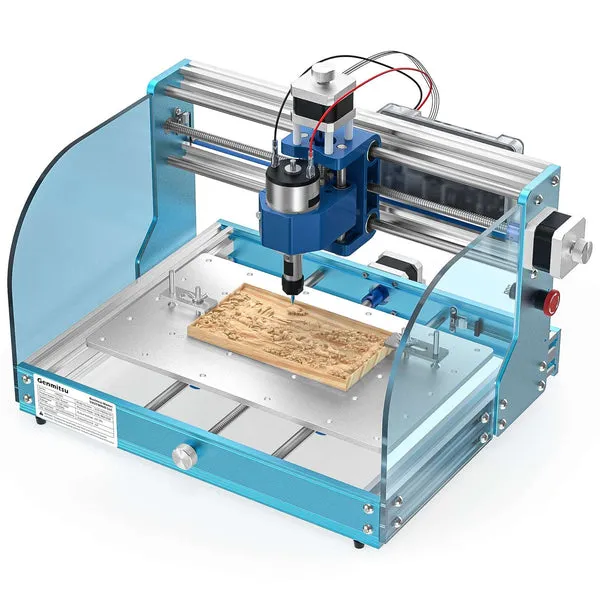
You found a deal. A 3018, a small Shapeoko clone, a budget spindle kit. $500 flat. You're thinking: "This is it. I'm in the CNC game."
Bits, workholding, extraction and software can add substantially to the machine price. Build an itemized budget before buying, including what you already own and what the kit leaves out.
This isn't a rant about cheap machines being bad—they're not. This is what nobody tells you: the machine itself is often the cheapest part of CNC ownership. By the time you're making clean, repeatable cuts, you've invested in a whole ecosystem of tools, materials, and software that the glossy YouTube reviews completely gloss over.
Let's do the real math.
The Bits Problem: $60–150
A single carbide end mill is $10–25. You'll break several learning. You need variety:
- 1/4" upcut spiral for general work
- 1/8" upcut for detail
- V-bit (60° or 90°) for text and engraving
- Ball nose for 3D work (optional but tempting)
Start with cutters for your first projects, then add sizes and geometries when a job requires them. A small, deliberate collection helps keep the tooling budget under control.
Real cost: $80–150 first year.
Workholding: $50–150
Check the workholding included with your machine. Depending on your projects, you may want:
- T-track system (aluminum extrusion + hardware): $40–80
- Clamp set (at least four good clamps): $30–50
- Masking tape and double-sided tape (endless): $20–30
- Surfacing bit to maintain your spoilboard: $15–25
Tape, clamps and fixtures each suit different jobs. Use a proven workholding method with adequate holding force and keep fixtures clear of the toolpath.
Real cost: $100–150.
Dust Collection: $80–300
"I'll just use a shop vac I already have."
Wood and MDF dust need effective capture and filtration. Match the dust shoe, hose and extractor; a cyclone reduces filter loading but is not a fine-dust filter. Budget for the complete system.
- Shop vac alone: $40–80
- Cyclone separator (cuts filter clogs dramatically): $30–50
- Dust extraction hood and tubing: $30–60
- Dust extractor: Choose a model with suitable wood-dust filtration and airflow, not just a preferred brand
A separator can reduce filter loading, but inspect the whole extraction system from the start.
Real cost: Price the dust shoe, hose, separator if needed, and a suitable filtered extractor together.
Software: The $350 Sting
Software costs depend on your machine and work. Fusion personal use has eligibility and CAM limits; Carbide Create needs Pro for standalone G-code export; VCarve Desktop is a one-time purchase with a job-size limit.
Check current licence terms before planning the workflow, especially for commercial projects and non-Carbide machines.
Real cost: $0–350 depending on your tolerance for limitations.
The Essentials You Forgot
- Z-probe: $15 to $30 for a basic touch plate. Useful for tool changes, but manual touch-off or another verified tool-length method can also work.
- Limit switches: $20–40. Optional but strongly recommended for safety and repeatability.
- Spindle collet wrench set: $15–30 if your spindle uses them.
- Extension cords, power strips, proper wiring: $30–50. Real breakers, not daisy chains.
- Hearing protection and dust mask: $30–50. This isn't negotiable—MDF dust and spindle noise are hazards.
- Practice material: $50 to $100 as an example allowance. Expect setup trials and some scrap while learning.
The Total Math by Machine Tier
The following is an illustrative year-one budget, not measured ownership data:
| Component | Budget Build ($500 machine) | Mid-Range ($1,000 machine) | Premium ($2,000 machine) |
|---|---|---|---|
| Machine | $500 | $1,000 | $2,000 |
| Bits (starter) | $100 | $120 | $150 |
| Workholding | $120 | $150 | $200 |
| Dust collection | $120 | $150 | $200 |
| Software | $0–350 | $0–350 | $0–350 |
| Consumables (tape, practice) | $100 | $120 | $150 |
| Probes, switches, wiring | $80 | $100 | $120 |
| Total Year 1 | $1,020 to $1,370 | $1,640–1,990 | $2,820–3,170 |
In this example, the accessory costs make the all-in budgets closer than the machine prices alone suggest. The table does not measure reliability, broken bits or cut quality; choose those on documented machine evidence.
The Chart: Where Your Money Actually Goes
The Upgrade Creep
The real cost trap isn't what you buy initially—it's that every problem you encounter costs money to solve:
- Bits keep breaking? Check feeds, engagement, runout, chip evacuation and workholding before buying upgrades.
- Tearout is terrible? Match the cutter and pass sequence to the visible surfaces; compression works only when properly engaged.
- Dust collection isn't keeping up? Replace the filter ($40), then add a separator ($50), then buy a real collector ($300).
- Software limitations hitting you? Pony up for VCarve Desktop ($350).
- Can't hold the workpiece down? More clamps, better T-track.
Keep a separate allowance for upgrades, but diagnose each problem before buying another accessory.
What We'd Buy
If starting fresh today with a $1,000 machine budget:
- Machine: Choose an actual model within the $1,000 allowance. A new Shapeoko 5.1 Pro 4x2 is listed at $3,550 before accessories, so it does not fit this example.
- Bit set ($80): Mix of upcut, downcut, V-bits from Amazon
- T-track setup ($120): Aluminum T-extrusion + good clamp set
- Shop vac + separator ($120): Fein or Festool if you can swing it; Rigid + separator if budget is tight
- VCarve Desktop ($350): Worth every penny for 2D/2.5D work
- Dust mask and earplugs ($40): Actual hearing damage is permanent
This illustrative $1,000-machine shopping list totals $1,710 before tax, delivery, practice material and any omitted equipment. It is a budget example, not evidence of achievable tolerances.
Shop This Guide
| Item | Source | Notes |
|---|---|---|
| Starter CNC Router Bit Set | Amazon → | Look for sets with upcut, downcut, and V-bits |
| T-Track Clamp Set | Amazon → | 4–6 clamps, aluminum extrusion included |
| Cyclone Dust Separator | Amazon → | Dramatically extends filter life |
| VCarve Desktop | Vectric → | One-time $350 purchase, unmatched for woodworking CAM |
| Shop Vacuum | Amazon → | Get a 2–3 HP model minimum |
Parts for this guide
If you are buying after reading this, these are the specs to look for.
| Part | What to buy | Where to look |
|---|---|---|
| Shop-vac cyclone separator The reader needs to budget for reducing chip loading and filter clogging during repeated wood cuts. | Vacuum-compatible cyclone with female 2.5-inch hose ports, sealed vacuum-rated collection container and correctly fitting hose cuffs; retains the extractor final filter. | |
| Starter upcut end mill The reader needs an inexpensive, correctly sized cutter for first pockets and profiles before buying a large bit collection. | Solid carbide 2-flute upcut, 3.175 mm cutting diameter and shank, 12 mm cutting length; requires a 3.175 mm collet and suits projects within that flute reach. | |
| Low-profile workholding clamps The reader needs to hold initial projects securely and include the matching bed hardware in the budget. | Low-profile CNC clamps with M6 studs and matching M6 threaded inserts for a new MDF spoilboard; choose studs that do not protrude below the board and keep clamps outside the cut. |
"Search" buttons open a search for that exact spec, so compare listings against it before buying. Some links earn us a commission at no extra cost to you (disclosure).
Related Guides
Frequently Asked Questions
How much does a hobby CNC router really cost?
Add the equipment missing from your chosen kit to its price. Bits, workholding, extraction, software and practice material vary with the machine and what you already own; there is no verified site average here.
What accessories do I need for a CNC router?
Essential: end mill set ($50–$150), dust collection ($100–$300), wasteboard ($30–$60), workholding clamps ($50–$100). Strongly recommended: touch probe ($20–$80), limit switches ($15–$30), enclosure materials ($50–$200). See our accessories directory.
Is a CNC router worth it as a hobby?
It can be worthwhile if you enjoy design, machining and learning the workflow. Selling work may offset costs, but break-even depends on demand, pricing, materials, failures and your time. Hobby value is the capability to make projects you want.
How much does CNC router maintenance cost per year?
Budget $150–$400/year total. Replacement bits are the main consumable ($100–$300/year), plus $20–$50 for lubrication and belts, and $30–$60 for wasteboard resurfacing material.